

Concurrent Execution#
You know how to describe GPU work with DeviceOperation, compose multi-stage
pipelines with and_then and zip!, and let the scheduling policy assign
streams. Now comes the payoff: running multiple pipelines at the same time.
This chapter walks through the async_mlp example end to end, showing how
Tokio tasks, the round-robin scheduler, and Rust’s ownership model come
together to process four batches concurrently on one GPU.
See also
CUDA Programming Guide – Multi-Device System for CUDA’s rules on multi-GPU contexts, peer access, and cross-device memory.
The scenario#
You are running a three-layer MLP forward pass: GEMM (matrix multiply), MatVec (matrix-vector product), and ReLU (activation). You have two weight matrices loaded on the GPU and four batches of input data to process. Each batch is independent – batch 0 does not depend on batch 1 – but they all share the same weights.
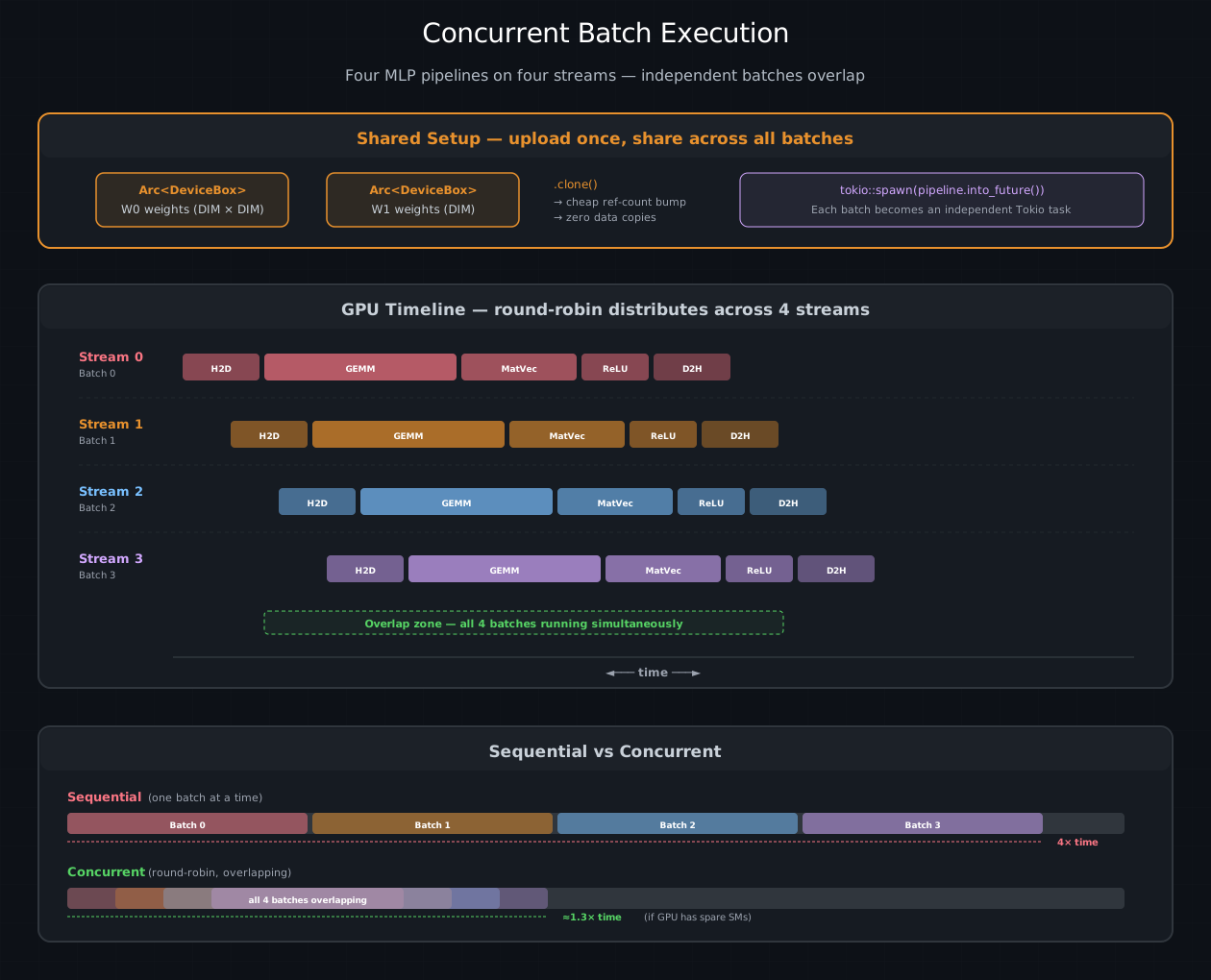
Four MLP forward passes running concurrently. Top: shared weights uploaded
once as Arc<DeviceBox>, cloned cheaply into each batch. Middle: the GPU
timeline — round-robin distributes batches across four streams, and the
staggered pipelines overlap. Bottom: sequential processing takes ~4× the
time of one batch; concurrent processing takes ~1.3× if the GPU has spare SMs.#
The sequential approach processes one batch at a time:
Batch 0:  ████ GEMM ████ MatVec ██ ReLU █ D2H █
                                                  Batch 1:  ████ GEMM ████ ...
The concurrent approach overlaps them across streams:
Stream 0:  ████ GEMM ████ MatVec ██ ReLU █ D2H █
Stream 1:    ████ GEMM ████ MatVec ██ ReLU █ D2H █
Stream 2:      ████ GEMM ████ MatVec ██ ReLU █ D2H █
Stream 3:        ████ GEMM ████ MatVec ██ ReLU █ D2H █
If the GPU has enough SMs to run multiple kernels simultaneously, the
overlapped version finishes significantly faster. And because each pipeline is
a single and_then chain on one stream, stages within a batch are still
strictly ordered – no cross-stream synchronization needed.
Step 1: Initialize the runtime#
Everything starts with init_device_contexts. This creates the CUDA context,
sets up the scheduling policy (round-robin with four streams by default), and
makes the thread-local state available for .sync() and .await:
use cuda_async::simt::device_context::init_device_contexts;

#[tokio::main]
async fn main() -> Result<(), Box<dyn std::error::Error>> {
    init_device_contexts(0, 1)?;
    let module = kernels::load_async(0)?;
The embedded module is loaded through the thread-local async context. The typed module handle can be cloned cheaply into each batch pipeline.
Step 3: Build and spawn batch pipelines#
Now the interesting part. For each batch, you build a lazy pipeline (no GPU
work yet) and hand it to tokio::spawn:
    let num_batches = 4;
    let mut handles = vec![];

    for batch_idx in 0..num_batches {
        let w0 = w0.clone();       // Arc clone: ~1 ns
        let w1 = w1.clone();
        let module = module.clone();

        let batch_data: Vec<f32> = (0..DIM * DIM)
            .map(|i| ((i + batch_idx * 37) % 13) as f32 * 0.1)
            .collect();

        let pipeline = zip!(h2d(batch_data), zeros(DIM * DIM), zeros(DIM))
            .and_then(move |(input, hidden, output)| {
                // Stage 1: GEMM — hidden = input × W0
                // ... build + finalize an owned launch, then chain with and_then ...
            })
            .and_then(move |(hidden, output, w1, module)| {
                // Stage 2: MatVec — output = hidden × W1
                // ...
            })
            .and_then(move |(output, module)| {
                // Stage 3: ReLU — result = max(0, output)
                // ...
            })
            .and_then(d2h);  // Stage 4: copy result to host

        handles.push(tokio::spawn(pipeline.into_future()));
    }
Let’s unpack what happens here:
pipelineis aDeviceOperation. It describes the entire forward pass but performs no GPU work. Building it is pure host-side computation – allocating closures and structs..into_future()converts it to aDeviceFuture. This triggers the scheduling policy, which picks a stream. Batch 0 gets stream 0, batch 1 gets stream 1, and so on – round-robin.tokio::spawnhands the future to the Tokio runtime. The runtime will poll it when the executor has capacity. On the first poll, the pipeline’sexecute()runs, submitting all the GPU work to the assigned stream.The runtime is free. After the first poll, the task is parked. The GPU is crunching numbers on four streams simultaneously. No host thread sits waiting.
When the GPU finishes a pipeline’s work, the
cuLaunchHostFunccallback fires, waking the corresponding Tokio task. The runtime re-polls it, delivering theVec<f32>result.
Step 4: Collect results#
    for (i, handle) in handles.into_iter().enumerate() {
        let result: Vec<f32> = handle.await??;
        println!("Batch {}: {} elements, first 4 = {:?}",
            i, result.len(), &result[..4]);
    }
The double ? unwraps two layers: the outer JoinError (in case the Tokio
task panicked) and the inner DeviceError (in case GPU work failed). In a
production system you would handle these separately.
.await vs .sync() vs tokio::spawn#
Having seen all three in action, here is when to reach for each:
.sync() blocks the calling thread until the GPU finishes. Use it in
scripts, tests, and anywhere you do not have an async runtime. Simple, no
ceremony, but no concurrency either – the host thread is stuck waiting:
let result = pipeline.sync()?;
.await yields the current async task while the GPU works. Other tasks on
the same Tokio thread can make progress. This is better than .sync() for
throughput but still sequential within the task – the code after .await does
not run until the operation completes:
let result = pipeline.await?;
tokio::spawn(op.into_future()) launches the pipeline as a fully
independent task. The spawning code continues immediately, and the result
arrives later via the join handle. This is the way to achieve true concurrency
– multiple pipelines running on different streams at the same time:
let handle = tokio::spawn(pipeline.into_future());
// ... spawn more pipelines, do other work ...
let result = handle.await??;
Tip
For a chain of dependent operations (like the four-stage forward pass),
prefer and_then over sequential .awaits. An and_then chain runs
entirely on one stream with zero scheduling overhead between stages.
Sequential .awaits go through the scheduling policy for each operation,
potentially landing on different streams and requiring cross-stream
synchronization.
Ownership patterns#
Concurrent GPU programming in Rust means Rust’s ownership rules are actively working for you – and occasionally getting in your way. Here are the patterns that come up repeatedly.
Moving data through and_then closures#
Each and_then closure captures data by move. The kernel launch produces
(), so you need to explicitly carry forward the buffers the next stage needs:
launch_gemm(input, hidden, w0)
    .and_then(move |()| {
        // input is consumed by the kernel. hidden and module survive
        // because they were captured but not consumed.
        value((hidden, output, w1, module))
    })
The closure returns a Value containing a tuple of everything the next stage
needs. This tuple is the “baton” passed between stages.
Keeping device memory alive#
A DeviceBox must stay alive until the GPU is done using it. In and_then
chains this is automatic – the closure owns the DeviceBox, and it lives until
the next stage takes it. The danger is with_context closures where you perform
an async copy and the DeviceBox might be dropped before the copy completes:
fn d2h(dev: DeviceBox<[f32]>) -> impl DeviceOperation<Output = Vec<f32>> {
    with_context(move |ctx| {
        let stream = ctx.get_cuda_stream();
        let mut host = vec![0.0f32; dev.len()];
        unsafe {
            memcpy_dtoh_async(
                host.as_mut_ptr(), dev.cu_deviceptr(),
                dev.len() * std::mem::size_of::<f32>(),
                stream.cu_stream(),
            ).unwrap();
        }
        // dev is captured by the closure and lives until the closure returns.
        // The stream will synchronize before the result is consumed,
        // so the async copy completes before dev is dropped.
        value(host)
    })
}
The key: dev is captured by the move closure and is not dropped until the
closure returns. Since the stream synchronizes before the DeviceFuture
delivers the result, the async copy finishes before dev is freed.
Error handling#
Errors from GPU work propagate through the Result chain just like any Rust
code. When running concurrent batches, you typically want to continue processing
even if one batch fails:
for (i, handle) in handles.into_iter().enumerate() {
    match handle.await {
        Ok(Ok(result)) => {
            println!("Batch {i}: {} elements", result.len());
        }
        Ok(Err(device_err)) => {
            eprintln!("Batch {i}: GPU error: {device_err}");
        }
        Err(join_err) => {
            eprintln!("Batch {i}: task panicked: {join_err}");
        }
    }
}
The three arms correspond to: success, a CUDA driver or scheduling error (e.g., out-of-memory, invalid launch config), and a Tokio task panic.
Multi-device execution#
For systems with multiple GPUs, pass a higher device count to
init_device_contexts:
init_device_contexts(0, 2)?; // default device 0, capacity for 2 devices
This sets the default device to GPU 0 and prepares the thread-local map for
two devices. Each device’s CUDA context, scheduling policy, and stream pool are
created lazily on first use. All policy-driven operations (.sync(), .await)
use the default device unless you explicitly target a different one. The
ExecutionContext carries the device ID, so operations on GPU 0 never
interfere with streams on GPU 1.
Tip
Multi-device programming requires attention to memory placement. A
DeviceBox allocated on GPU 0 is not accessible from GPU 1 unless peer
access is enabled. Use with_context to check ctx.get_device_id() when
building device-specific operations.
Performance tuning#
Stream pool sizing#
The default pool of four streams works well for most workloads, but if you are chasing the last few percent of throughput, the right pool size depends on your situation:
Workload |
Suggested pool size |
Why |
|---|---|---|
One large kernel per launch |
1–2 |
The kernel already saturates the GPU |
Many small kernels |
4–8 |
Overlap launch overhead between streams |
Mixed kernel + memcpy |
2–4 |
Overlap compute with data transfer |
Latency-sensitive serving |
1 per request |
Avoid head-of-line blocking |
Profiling#
Nsight Systems is the standard tool for visualizing stream occupancy:
nsys profile --trace=cuda cargo oxide run async_mlp
nsys-ui report.nsys-rep
Look for gaps between kernels on the same stream (launch overhead), idle streams in the pool (unbalanced work distribution), and unexpected serialization across streams (missing or extra dependencies).
Common pitfalls#
Pitfall |
What you see |
Fix |
|---|---|---|
|
Blocks the Tokio thread, stalling all tasks on it |
Use |
|
Use-after-free crash or corrupted results |
Keep ownership in |
Too many streams |
Scheduling overhead exceeds overlap benefit |
Profile, reduce pool size |
Missing |
|
Call once at program start |
See also
The Async MLP Pipeline project chapter
has the full async_mlp source with build instructions and expected output.