

Launching Kernels#
Writing a kernel is only half the story. The host must load device code,
configure the launch grid, marshal arguments, and dispatch the work to the GPU.
The primary cuda-oxide launch path is #[cuda_module]: it embeds the generated
device artifact into the host binary and generates typed launch methods. The
lower-level load_kernel_module and cuda_launch! APIs remain available when
you need explicit sidecar loading or custom launch code; note cuda_launch!
is unsafe and must be wrapped in unsafe { }.
See also
CUDA Programming Guide – Execution Configuration
for the authoritative reference on <<<grid, block, smem, stream>>> semantics.
The launch lifecycle#
Every kernel launch follows the same sequence:
Initialize a CUDA context – bind to a GPU device.
Load the device module – usually from the embedded artifact bundle.
Look up the kernel function – by its PTX entry point name.
Configure the grid – block dimensions, grid dimensions, shared memory.
Launch – enqueue the kernel on a stream.
Synchronize – wait for results (explicit or implicit).
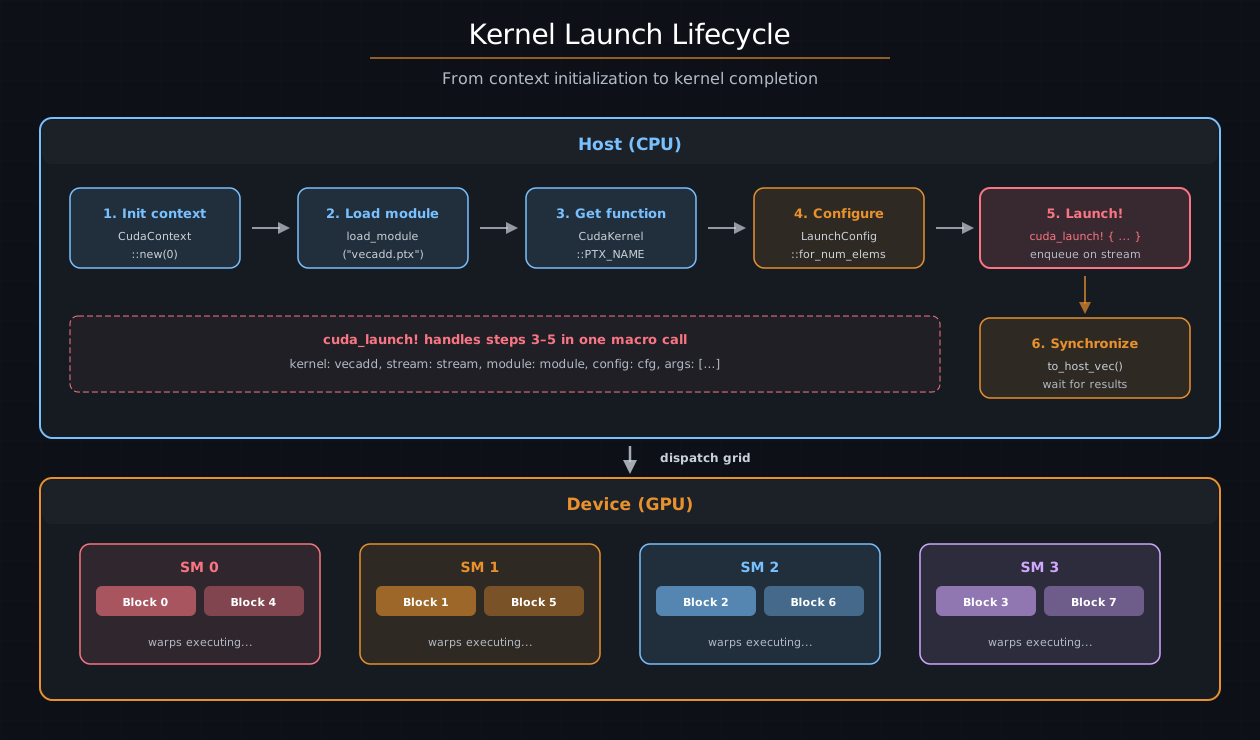
The kernel launch lifecycle. The host initializes a context, loads the device module, configures the grid, and launches via a typed method. The GPU scheduler dispatches blocks to SMs.#
In practice, #[cuda_module] handles steps 2–5 behind a generated Rust API.
You normally interact with context creation, kernels::load, and a typed method
call.
#[cuda_module] – typed arguments#
Wrap kernels in an inline #[cuda_module] module to generate a typed loader and
one method per #[kernel]. The generated signature checks kernel arguments,
but a raw LaunchConfig does not prove the kernel’s indexing shape or resource
requirements. The raw launch method is therefore unsafe.
raw LaunchConfig   -> unsafe launch
PreparedLaunch<K>  -> safe launch of exactly K
“Synchronous” here means that you provide a stream and enqueue immediately; GPU execution can still overlap the host until you synchronize.
use cuda_core::simt::LaunchConfig;
use cuda_core::{CudaContext, DeviceBuffer};
use cuda_device::{DisjointSlice, cuda_module, kernel, thread};

#[cuda_module]
mod kernels {
    use super::*;

    #[kernel]
    pub fn vecadd(a: &[f32], b: &[f32], mut c: DisjointSlice<f32>) {
        let idx = thread::index_1d();
        let i = idx.get();
        if let Some(c_elem) = c.get_mut(idx) {
            *c_elem = a[i] + b[i];
        }
    }
}

fn main() {
    let ctx = CudaContext::new(0).unwrap();
    let stream = ctx.default_stream();
    let module = kernels::load(&ctx).unwrap();

    let a = DeviceBuffer::from_host(&stream, &[1.0f32; 1024]).unwrap();
    let b = DeviceBuffer::from_host(&stream, &[2.0f32; 1024]).unwrap();
    let mut c = DeviceBuffer::<f32>::zeroed(&stream, 1024).unwrap();

    // SAFETY: this is a 1D launch and all three buffers contain 1024 elements.
    unsafe {
        module.vecadd(&stream, LaunchConfig::for_num_elems(1024), &a, &b, &mut c)
    }
    .expect("Kernel launch failed");

    let result = c.to_host_vec(&stream).unwrap();
    assert_eq!(result[0], 3.0);
}
Field-by-field breakdown#
Piece |
Description |
|---|---|
|
Generates loader and launch methods |
|
Loads the embedded artifact bundle |
|
Type-checks arguments; raw config requires |
|
Grid/block dimensions and smem |
Argument mapping#
The generated method maps kernel parameters to host values:
Kernel parameter |
Host argument |
GPU ABI |
|---|---|---|
|
|
Pointer + length |
|
|
Pointer + length |
|
|
Pointer + length |
scalar/raw pointer |
Same value |
Value directly |
Return value#
Raw typed launch methods return Result<(), DriverError>. The Ok case means the
kernel was successfully enqueued – not that it finished. To check for
runtime errors (e.g., out-of-bounds trap), synchronize the stream or context
afterward.
Safe prepared launches#
Declare the kernel’s geometry when it is part of correctness:
use cuda_core::LaunchConfig1D;
use cuda_device::{DisjointSlice, cuda_module, kernel, launch_bounds, launch_contract, thread};

#[cuda_module]
mod contracted {
    use super::*;

    #[kernel]
    #[launch_bounds(256)]
    #[launch_contract(domain = 1, block = (256, 1, 1))]
    pub fn vecadd(a: &[f32], b: &[f32], mut c: DisjointSlice<f32>) {
        let idx = thread::index_1d();
        let i = idx.get();

        if let Some(c_elem) = c.get_mut(idx) {
            *c_elem = a[i] + b[i];
        }
    }
}

// SAFETY: this package embeds the artifact compiled from this `contracted` module.
let module = unsafe { contracted::load(&ctx)? };
let config = LaunchConfig1D::new(4, 256, 0);
let prepared = module.prepare_vecadd(config)?;
module.vecadd(&stream, &prepared, &a, &b, &mut c)?;
Loading a contracted module is unsafe because the caller must ensure the selected artifact was compiled from this module. A matching package or kernel name alone does not prove that its ABI and launch requirements match. Once the correct artifact is loaded, preparation checks its declared launch contract.
prepare_vecadd checks the exact block shape, device limits, dynamic shared
memory, context, and any cluster/cooperative requirements. LaunchConfig1D
cannot represent active Y/Z dimensions, and PreparedLaunch<vecadd> cannot be
used with another kernel. Preparation may fail; once it succeeds, the branded
launch can be reused safely.
Cluster and cooperative attributes may be declared together
(#[cluster_launch(...)] + #[cooperative_launch]). Preparation proves the
cluster shape with cuOccupancyMaxActiveClusters, then requires the whole
grid to fit in that concurrent cluster capacity so a cooperative
grid::sync() cannot hang on non-resident blocks. An oversized grid fails
preparation with LaunchContractError::CooperativeGridTooLarge (or a related
cluster residency error) instead of submitting an unsound launch.
For a contracted kernel, the raw escape hatch is named vecadd_unchecked and
remains unsafe. Uncontracted kernels expose only unsafe raw launch methods.
Compile-time policy configuration#
A kernel policy is a named collection of compile-time choices. It can describe tile shapes, operation atoms, launch bounds, loop-unroll factors, or any other configuration that a kernel library wants to expose.
Policies are represented by Rust types rather than runtime values. A generic kernel is monomorphized once for every concrete policy type used by the host:
transform::<SmallTilePolicy> -> transform_TID_<A>
transform::<WideTilePolicy>  -> transform_TID_<B>
Each specialization has its own PTX entry point and its own folded constants. The policy is not passed as a kernel argument, and the generated kernel does not contain a runtime branch that selects a policy.
Define a domain-specific policy#
cuda_device::config::Policy deliberately contains only a stable identifier.
Kernel libraries extend it with associated types and constants that are
meaningful for their domain:
use cuda_device::config::{
    Atom, AtomKind, AtomSpec, Block, Global, Policy, PolicyId, RowMajor, Shape1, Thread, Tile,
    TileSpec,
};

enum XorRotate {}
impl AtomKind for XorRotate {}

trait VectorPolicy: Policy {
    type BlockTile: TileSpec<
        Layout = RowMajor,
        MemorySpace = Global,
        Scope = Block,
    >;

    type ElementAtom: AtomSpec<
        Kind = XorRotate,
        Scope = Thread,
    >;

    const MAX_THREADS: u32;
    const MIN_BLOCKS: u32;
    const ITEMS_PER_THREAD: u32;
    const UNROLL: u32;
    const TAG: u32;
}
Tile, Atom, Shape, layout, memory-space, and scope types are metadata.
They do not allocate memory, provide pointer access, emit an instruction, or
synchronize threads. The domain-specific trait and kernel implementation decide
what those descriptions mean and which combinations are valid.
Define concrete policies#
A concrete policy implements both Policy and the domain-specific policy
trait:
enum SmallTilePolicy {}

impl Policy for SmallTilePolicy {
    const ID: PolicyId =
        PolicyId::new(0x706f_6c69_6379_5f63, 1);
}

impl VectorPolicy for SmallTilePolicy {
    type BlockTile =
        Tile<Shape1<1024>, RowMajor, Global, Block>;

    type ElementAtom =
        Atom<XorRotate, Shape1<1>, Thread>;

    const MAX_THREADS: u32 = 64;
    const MIN_BLOCKS: u32 = 2;
    const ITEMS_PER_THREAD: u32 = 16;
    const UNROLL: u32 = 2;
    const TAG: u32 = 0x1357_9bdf;
}
A second policy can select a different tile, launch bound, and unroll factor without duplicating the kernel:
enum WideTilePolicy {}

impl Policy for WideTilePolicy {
    const ID: PolicyId =
        PolicyId::new(0x706f_6c69_6379_5f63, 2);
}

impl VectorPolicy for WideTilePolicy {
    type BlockTile =
        Tile<Shape1<4096>, RowMajor, Global, Block>;

    type ElementAtom =
        Atom<XorRotate, Shape1<1>, Thread>;

    const MAX_THREADS: u32 = 256;
    const MIN_BLOCKS: u32 = 1;
    const ITEMS_PER_THREAD: u32 = 16;
    const UNROLL: u32 = 4;
    const TAG: u32 = 0x2468_ace0;
}
PolicyId is an explicit library-facing identity. Its namespace and value are
supplied by the policy author and must remain stable while the policy’s
generated behavior remains unchanged. It is not derived from Rust TypeId,
compiler mangling, a type name, or a compiler-generated hash.
cuda-oxide does not maintain a global policy-ID registry. A policy library is responsible for choosing its namespace and preventing duplicate IDs.
Use policy constants in a kernel#
Policy-associated constants can be used by supported compile-time attributes:
use cuda_device::{cuda_module, kernel, launch_bounds, launch_contract, thread};

#[cuda_module]
mod kernels {
    use super::*;

    #[kernel]
    #[launch_bounds(P::MAX_THREADS, P::MIN_BLOCKS)]
    #[launch_contract(domain = 1)]
    pub unsafe fn transform<P: VectorPolicy>(
        input: *const u32,
        output: *mut u32,
        count: u32,
    ) {
        let base =
            thread::index_1d().get()
                * P::ITEMS_PER_THREAD as usize;

        let mut lane = 0;

        #[unroll(P::UNROLL)]
        while lane < count {
            let index = base + lane as usize;

            // SAFETY: the caller provides readable and writable storage
            // for every active thread and keeps count within the tile.
            let value =
                unsafe { input.add(index).read_volatile() } ^ P::TAG;

            unsafe {
                output.add(index).write_volatile(value);
            }

            lane += 1;
        }
    }
}
rustc resolves the associated constants after monomorphization. cuda-oxide therefore sees concrete values for each specialization:
SmallTilePolicy:
  launch_bounds = (64, 2)
  unroll         = 2

WideTilePolicy:
  launch_bounds = (256, 1)
  unroll         = 4
MAX_THREADS specifies the maximum block size accepted by that specialization.
It does not force every launch to use exactly that number of threads.
MIN_BLOCKS is a compiler occupancy hint represented by PTX
.minnctapersm. It is not a grid or block dimension and is not enforced as
launch geometry.
UNROLL is a partial-unroll factor. UNROLL = 4 groups four loop iterations
per transformed loop body; it does not limit the loop to four iterations.
Runtime bounds and remainder iterations are preserved.
Invalid or unevaluatable policy expressions produce compilation errors instead of silently using default values.
Prepare a policy-specific launch#
Generic kernels generate generic host methods whose policy parameter selects the concrete kernel specialization:
use cuda_core::LaunchConfig1D;

let small_launch =
    module.prepare_transform::<SmallTilePolicy>(
        LaunchConfig1D::new(1, 64, 0),
    )?;

let wide_launch =
    module.prepare_transform::<WideTilePolicy>(
        LaunchConfig1D::new(1, 256, 0),
    )?;
The generated launch contract is evaluated independently for each specialization:
SmallTilePolicyrejects blocks larger than 64 threads.WideTilePolicyrejects blocks larger than 256 threads.
A prepared launch remains branded for the selected kernel specialization. A
PreparedLaunch created for one policy cannot be passed to another policy’s
launch method.
The policy changes compile-time code generation and launch validation, but it does not prove raw-pointer memory safety. Kernels that accept raw pointers remain unsafe to call:
// SAFETY: the pointers cover the complete policy tile and remain valid
// until the stream completes the launch.
unsafe {
    module.transform::<SmallTilePolicy>(
        &stream,
        &small_launch,
        input,
        output,
        count,
    )?;
}
Current limitations#
Policy expressions are currently supported first for:
#[launch_bounds(...)]partial loop
#[unroll(...)]
Generic constant expressions require Rust’s generic_const_exprs feature:
#![feature(generic_const_exprs)]
#![allow(incomplete_features)]
The following values currently remain literal rather than policy-derived:
launch_contractfieldscluster dimensions
dynamic shared-memory sizes
A policy-derived maximum launch bound can still be combined with a host launch contract. The contract and the policy maximum are checked separately for each monomorphized specialization.
Any additional named constants referenced by a policy-derived launch-bound maximum must be visible at module scope because the host launch contract is generated beside the kernel function.
Complete example#
The
policy_config
example defines two policies for one generic kernel and verifies that they
produce:
distinct host-addressable PTX entries
distinct
.maxntidand.minnctapersmdirectivesfolded policy-specific constants
different partial-unroll factors in raw LLVM IR
policy-specific prepared-launch validation
Build and inspect the generated artifacts without a GPU:
cargo oxide build policy_config

cargo run --release \
  --manifest-path crates/rustc-codegen-cuda/examples/policy_config/Cargo.toml \
  -- --verify-ptx
Use --release for the verifier because compiler-generated specialization
names can differ between build profiles. PolicyId remains the explicit,
profile-independent policy identity.
cuda_launch! – unsafe lower-level launch#
cuda_launch! is the explicit, unsafe escape hatch below #[cuda_module].
Its niche is modules loaded at runtime by name (a sidecar PTX/cubin/LTOIR
artifact you choose manually), where no compile-time kernel signature exists
to check against.
Because the macro cannot verify the argument list, every use must sit inside
an unsafe { } block. The caller promises that argument count, order, and
types match the kernel’s actual signature, and that pointer arguments are
device-accessible. A mismatch is undefined behavior: the driver reads past
the end of the args array, or the device dereferences junk.
use cuda_host::{cuda_launch, load_kernel_module};

let module = load_kernel_module(&ctx, "vecadd").unwrap();

// SAFETY: args match vecadd, buffers are live, and the config is 1D with
// bounds guarded by c.get_mut(idx).
unsafe {
    cuda_launch! {
        kernel: vecadd,
        stream: stream,
        module: module,
        config: LaunchConfig::for_num_elems(1024),
        args: [slice(a), slice(b), slice_mut(c)]
    }
}
.expect("Kernel launch failed");
The wrappers in args produce the same host packet as the generated
#[cuda_module] methods: slice(...) and slice_mut(...) push the
(ptr, len) pair, scalar arguments push their value directly, and a
closure or by-value struct pushes as a single byval value (the kernel
boundary receives it as one .param, not as per-field flattened
parameters).
Artifact policy#
#[cuda_module] is a launch-surface feature, not a target-selection feature. It
loads the embedded payload that the compiler placed in the host binary. Decisions
such as PTX versus LTOIR, cubin versus fatbin, or single-arch versus multi-arch
packaging live in the compiler and artifact/runtime loader layers. Keeping that
policy separate lets the generated Rust launch methods stay stable as payload
formats evolve.
PTX and cubin payloads load directly. NVVM IR records its target because pre-Blackwell GPUs use LLVM 7 typed pointers, while Blackwell and newer GPUs use opaque pointers. The loader uses that recorded target when invoking libNVVM.
NVVM IR and LTOIR normally compile for their original target. For a standard
pre-Blackwell target such as sm_86, the loader can instead produce PTX and let
the CUDA driver JIT it on Blackwell. This is not supported for suffixed targets
such as sm_90a, or for running newer-GPU artifacts on older GPUs.
The driver must also support the PTX version produced by the selected toolkit.
CUDA error 222 means the toolkit is too new for the driver’s PTX JIT; select a
compatible toolkit or upgrade the driver. The
installation guide
explains why this can differ from the normal LLVM-to-PTX path.
LaunchConfig#
LaunchConfig specifies the grid shape:
use cuda_core::simt::LaunchConfig;

let config = LaunchConfig {
    grid_dim: (num_blocks, 1, 1),
    block_dim: (256, 1, 1),
    shared_mem_bytes: 0,
};
Field |
Type |
Description |
|---|---|---|
|
|
Number of blocks in x, y, z |
|
|
Threads per block in x, y, z |
|
|
Dynamic shared memory per block |
for_num_elems helper#
For 1D data-parallel kernels, the common pattern is one thread per element:
let config = LaunchConfig::for_num_elems(N as u32);
This uses 256 threads per block and computes the grid size via ceiling
division: grid_x = (N + 255) / 256. It is a convenient 1D shape, but it is
still raw data; only preparation ties a configuration to a kernel.
2D and 3D configurations#
For matrix operations, use 2D block and grid dimensions:
let config = LaunchConfig {
    grid_dim: ((cols + 15) / 16, (rows + 15) / 16, 1),
    block_dim: (16, 16, 1),
    shared_mem_bytes: 0,
};
Inside the kernel, combine threadIdx_x() / blockIdx_x() with their _y()
counterparts to compute row and column indices.
Choosing block size#
The block size is the single most important tuning parameter (see the Execution Model chapter for details). Quick guidelines:
256 is a safe default for most kernels.
Powers of 2 (128, 256, 512) align with warp boundaries.
Use
#[launch_bounds]to hint the compiler about your intended block size.
Typed async launch#
With the cuda-host async feature enabled, #[cuda_module] also generates
borrowed and owned async methods. These return lazy DeviceOperation values
instead of enqueuing immediately. No stream is specified at launch time – the
scheduling policy chooses one when the operation is executed:
use cuda_async::simt::device_context::init_device_contexts;
use cuda_async::simt::device_operation::DeviceOperation;

init_device_contexts(0, 1)?;
let module = kernels::load_async(0)?;

// SAFETY: this is 1D, buffers contain 1024 elements, and module/scheduler share a context.
let op = unsafe {
    module.vecadd_async(
        LaunchConfig::for_num_elems(1024),
        &a_dev,
        &b_dev,
        &mut c_dev,
    )
}?;

// Execute and wait
op.sync()?;
Use the owned form when the operation must be spawned or stored as a 'static
future:
use std::future::IntoFuture;

// SAFETY: this is 1D, owned buffers contain 1024 elements, and contexts match.
let op = unsafe {
    module.vecadd_async_owned(
        LaunchConfig::for_num_elems(1024),
        a_dev,
        b_dev,
        c_dev,
    )
}?;

let (a_dev, b_dev, c_dev) = tokio::spawn(op.into_future()).await??;
Async buffer lifetimes#
Async launches are lazy, so pointer lifetimes matter:
raw pointer shape:
  build op from CUdeviceptr
  drop buffer
  run op later  -> stale pointer

borrowed typed shape:
  build op from &DeviceBuffer
  Rust keeps the buffer borrowed until op completes

owned typed shape:
  move DeviceBox into op
  spawned task owns the allocation until completion
For a contracted kernel, both async forms accept &PreparedLaunch<K> and are
safe. cuda_launch_async! remains a lower-level unsafe migration API; its
invocation must be inside an unsafe block. Raw pointer async launches are only
correct when the caller can prove that the allocation outlives the lazy
operation.
.sync() vs .await#
Method |
What it does |
|---|---|
|
Execute on the default scheduling policy, block the current thread until complete |
|
Execute and yield the current async task (requires a Tokio runtime) |
Composing GPU work#
DeviceOperation supports functional composition. Chain operations with
and_then and run independent work in parallel with zip!:
use cuda_async::zip;

let forward_pass = layer1_op
    .and_then(|output1| layer2_op(output1))
    .and_then(|output2| layer3_op(output2));

// Run two independent operations concurrently
let combined = zip!(branch_a, branch_b);
let (result_a, result_b) = combined.sync()?;
Each operation in the chain is scheduled onto a stream only when it executes.
The and_then combinator passes the output of one operation as input to the
next, forming a lazy computation graph.
See also
The Async GPU Programming
section covers DeviceOperation, scheduling policies, and stream management in
depth.
Cluster launch#
Thread Block Clusters (Hopper and newer) allow blocks to cooperate beyond shared
memory via distributed shared memory (DSMEM). To launch with clusters, add
#[cluster_launch] to the kernel and include cluster_dim in the launch:
use cuda_device::{DisjointSlice, cluster, cluster_launch, kernel};

#[kernel]
#[cluster_launch(4, 1, 1)]
pub fn cluster_kernel(mut out: DisjointSlice<u32>) {
    let rank = cluster::block_rank();
    // Blocks 0-3 can communicate via DSMEM
}
On the host, the launch uses launch_kernel_ex (the extended launch API) with
cluster dimensions. cuda_launch! supports this via the cluster_dim field:
// SAFETY: args/config match cluster_kernel, including its 4-block cluster;
// out_dev stays live through synchronization.
unsafe {
    cuda_launch! {
        kernel: cluster_kernel,
        stream: stream,
        module: module,
        config: config,
        cluster_dim: (4, 1, 1),
        args: [slice_mut(out_dev)]
    }
}
.expect("Cluster launch failed");
Tip
Cluster launch requires Hopper (sm_90) or newer. The maximum cluster size is
typically 16 blocks. Use cargo oxide build --arch sm_90 to target Hopper.
Cooperative launch#
Grid-wide barriers (cuda_device::grid::sync() or this_grid().sync()) only
work when every block in the grid is resident on the device at the same time.
A cooperative launch asks the driver to guarantee exactly that; without
it, blocks that have not been scheduled yet can never reach the barrier and
the kernel deadlocks.
On the typed #[cuda_module] path, mark the kernel with
#[cooperative_launch]. Every generated launch method (sync, async, and
owned-async) then submits through cuLaunchKernelEx with the
CU_LAUNCH_ATTRIBUTE_COOPERATIVE attribute set:
use cuda_device::{DisjointSlice, cooperative_launch, grid, kernel};

#[cuda_module]
mod kernels {
    use super::*;

    #[kernel]
    #[cooperative_launch]
    pub fn grid_sync_kernel(mut out: DisjointSlice<u32>) {
        // ... per-block work ...
        grid::sync();
        // ... grid-wide post-barrier work ...
    }
}

let module = kernels::load(&ctx)?;
// SAFETY: config satisfies the kernel's indexing, residency, and output bounds.
unsafe { module.grid_sync_kernel(&stream, config, &mut out_dev) }?;
Unlike #[cluster_launch], the attribute changes nothing in the PTX; it only
changes how the host submits the launch. The two attributes may be combined
on one kernel, in which case both launch attributes go into the same
cuLaunchKernelEx call.
The legacy (caller-unsafe) cuda_launch! macro offers the same behaviour
through its cooperative: true field.
Tip
The whole grid must fit on the device in a single wave, or the driver rejects
the launch with CUDA_ERROR_COOPERATIVE_LAUNCH_TOO_LARGE. Size the grid from
cuOccupancyMaxActiveBlocksPerMultiprocessor (blocks per SM × SM count) when
in doubt.
Common launch errors#
Error |
Likely cause |
Fix |
|---|---|---|
|
Grid or block dimensions are zero or exceed limits |
Check |
|
PTX entry point name doesn’t match |
Verify |
|
Too much shared memory or too many registers per block |
Reduce |
|
Kernel hit a trap (panic, assert failure, OOB) |
Debug with |
|
PTX compiled for wrong architecture |
Rebuild with |
|
Driver cannot compile the PTX version in the module |
Select a compatible |
|
|
Install an R580+ driver; the error text names the files the loader tried |
|
Driver symbol missing from the loaded |
Upgrade the driver to the toolkit’s CUDA version |
See also
The Error Handling and Debugging chapter covers how to diagnose and fix kernel failures in detail.