
PICO VR Whole-body Teleop#
Full whole-body teleoperation using PICO VR headset and controllers. To teleop, use the option --input-type zmq_manager during deployment. The zmq_manager input type switches between a planner mode (locomotion commands via ZMQ) and a streamed motion mode (full-body SMPL poses from PICO).
SONIC Low Latency#
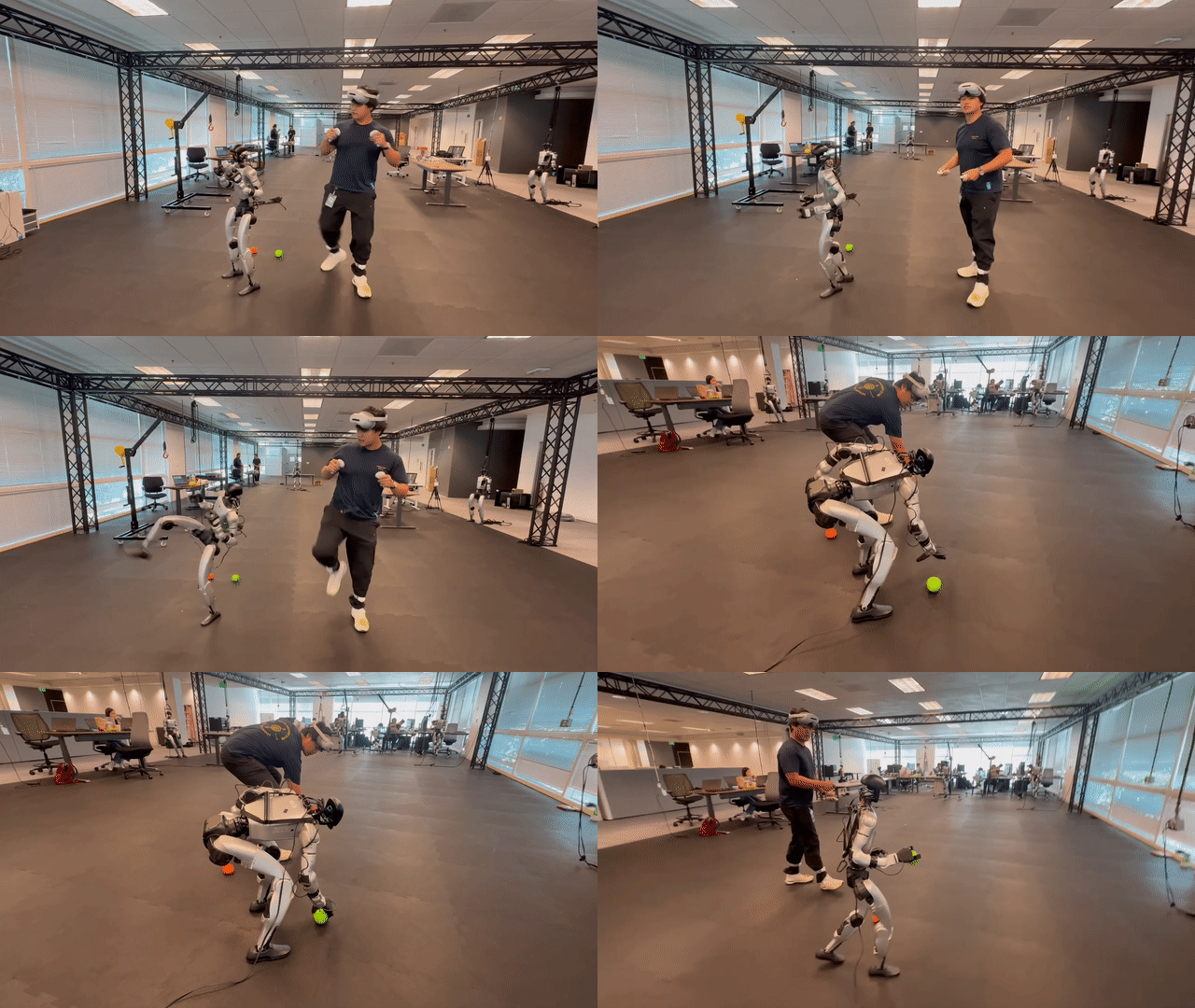
The sequence below shows SONIC Low Latency running in whole-body teleoperation mode, including a successful ground pickup.
Safety Warning
Whole-body teleoperation involves fast, agile motions. Always maintain a clear safety zone and keep a safety operator at the keyboard ready to trigger an emergency stop (O in the C++ terminal, or A+B+X+Y on the PICO controllers).
You must wear tight-fitting pants or leggings to guarantee line-of-sight for the foot trackers — loose or baggy clothing can make tracking fail unpredictably and may result in dangerous motion.
Video: End-to-end teleoperation walkthrough — PICO calibration, policy engagement, and the robot balancing independently. See the Teleoperation Guide for detailed best practices.
Prerequisites#
Completed the Quick Start — you can run the sim2sim loop (includes installing the deployment and downloading model checkpoints).
Completed the VR Teleop Setup —
.venv_teleopis ready, and the PICO hardware is paired and calibrated.
Step-by-Step: Teleop in SIM#
Run three terminals to teleoperate the simulated robot.
Terminal 1 — Launch virtual robot in MuJoCo Simulator#
On the deployment host, from the repo root:
# bash install_scripts/install_pico.sh

source .venv_teleop/bin/activate
python gear_sonic/scripts/run_sim_loop.py
Terminal 2 — C++ Deployment#
Run native deployment with the TensorRT package for your platform from the Installation Guide:
cd gear_sonic_deploy
export TensorRT_ROOT=$HOME/TensorRT

source scripts/setup_env.sh
just build                                  # first run only
./deploy.sh --input-type zmq_manager sim
# Wait until you see "Init done"
Running on Separate Hosts
The streamer receives PICO tracking data. The deployment host runs the C++ policy and, for Sim2Sim, the MuJoCo simulator.
On the deployment host, add
--zmq-host <streamer-ip>to./deploy.shto receive commands and poses from the streamer’s TCP port 5556.On the streamer host, add
--zmq_feedback_host <deployment-ip>topico_manager_thread_server.pyto receive robot-state feedback from the deployment host’s TCP port 5557.
Both flags default to localhost for a single-host setup. These settings apply to both XRoboToolkit and IsaacTeleop.
If a firewall is enabled, allow TCP 5556 on the streamer host from the deployment host, and TCP 5557 on the deployment host from the streamer host.
Terminal 3 — PICO Teleop Streamer#
On the streamer host, from the repo root:
source .venv_teleop/bin/activate

# With full visualization (recommended for first run):
python gear_sonic/scripts/pico_manager_thread_server.py --manager \
    --vis_vr3pt --vis_smpl

# Without visualization (for headless / onboard practice):
# python gear_sonic/scripts/pico_manager_thread_server.py --manager
IsaacTeleop (CloudXR)
To use IsaacTeleop, add --input-source isaac-teleop and follow the Isaac Teleop Setup.
When you turn on the visualization, wait for a window to pop up showing a Unitree G1 mesh with all joints at the default angles. If no window shows up on the default PICO path, double-check the PICO’s XRoboToolKit IP configuration in the VR Teleop Setup. If you are using Isaac Teleop instead, verify the headset is connected to the in-process CloudXR runtime — see Isaac Teleop Setup for connection steps.
Your First Teleop Session#
Assume the calibration pose — stand upright, feet together, upper arms at your sides, forearms bent 90° forward (L-shape at each elbow), palms inward. See Calibration Pose for details.
Press A + B + X + Y simultaneously to engage the control policy and run the initial full calibration (
CALIB_FULL).Align your arms with the robot’s current pose, then press A + X to enter full-body SMPL teleop (POSE mode). Move your arms and legs — the robot follows.
Press A + X again to fall back to PLANNER (idle) mode.
Press A + B + X + Y again to stop the robot.
Complete PICO Controls#
Modes & Calibration#
The system has 4 operating modes and 2 calibration types.
Modes:
Mode |
Encoder |
Description |
|---|---|---|
OFF |
– |
Policy not running. Stand in calibration pose, then press A+B+X+Y to start policy. |
POSE |
SMPL |
Whole-body teleop — streaming the SMPL pose from PICO to the C++ deployment side. Your motion will directly map to the robot . |
PLANNER |
G1 |
Locomotion planner active; upper body controller by planner. Joysticks control direction and heading in walking and running modes. |
PLANNER_FROZEN_UPPER |
G1 |
Planner locomotion; upper body frozen at last POSE snapshot. |
VR_3PT |
TELEOP |
Planner locomotion; upper body follows VR 3-point tracking (head + 2 hands). Depends on non-IK-based VR 3-point calibration. |
Calibration types (non-IK workflow for minimal latency):
Type |
What Is Calibrated |
When Triggered |
|---|---|---|
CALIB_FULL |
Head + both wrists against all-zero reference pose. |
Once on first A+B+X+Y (startup). |
CALIB |
Both wrists only against the current robot pose. |
Each switch into VR_3PT via Left Stick Click. |
State Machine#
There are 4 modes and 2 control chains. Each chain forms a triangle: A+X (or B+Y) returns to POSE from both the planner node and its VR_3PT sub-mode.
  ┌──────────────────────────────────────┐
  │  A+B+X+Y (any mode) ──► OFF          │
  └──────────────────────────────────────┘

  Startup:
    OFF ──(A+B+X+Y)──► PLANNER ──(A+X)──► POSE
          CALIB_FULL

  Chain 1 — G1 encoder listens to planner-generated full-body motion: PLANNER

    PLANNER ─── L-Stick (+CALIB) ──► VR_3PT
     ▲    │ ◄─────── L-Stick ─────────  │
     │    │                             │
     │A+X │A+X                    A+X   │
     │    ▼                             ▼
     └─ POSE ◄──────────────────────────┘

  Chain 2 — G1 encoder listens to planner-generated lower-body motion: PLANNER_FROZEN_UPPER

    PLANNER_FROZEN_UPPER ── L-Stick (+CALIB) ──► VR_3PT
         ▲     │ ◄──────── L-Stick ──────────     │
         │     │                                  │
         │B+Y  │B+Y                          B+Y  │
         │     ▼                                  ▼
         └── POSE ◄───────────────────────────────┘
DANGER — Mode-Switching Safety
Before switching into POSE or VR_3PT, always align your body with the robot’s current pose first!!
POSE: The robot instantly snaps to your physical pose. A large mismatch causes sudden, aggressive motion.
VR_3PT: A misaligned calibration produces erratic, dangerous motion as soon as you move your arms. Check more info at section per-switch-calib
VR_3PT Calibration Hint#
The VR_3PT mode depends on accurate calibration. Two calibration events occur:
One-time CALIB_FULL (head + wrists)#
Before pressing A + B + X + Y for the first time, you must stand in the robot’s all-zero reference pose. The system captures your PICO body-tracking frame as the zero-reference for all subsequent motion mapping.
The reference pose:
Stand upright, feet together, looking straight forward.
Upper arms hang straight down, close to your torso.
Forearms bent 90° forward (L-shape at each elbow), palms facing inward.
Tip
Launch the teleop script with --vis_vr3pt to see the robot’s reference pose in a visualization window. Match your body to it before pressing the start combo.
Per-switch CALIB (wrists only)#
Each time you enter VR_3PT via Left Stick Click, the system re-calibrates both wrists against the robot’s current pose. Always align your arms with the robot before clicking.
Below is an example of bad calibration practice — transitioning into VR_3PT without aligning your arms to the robot’s current pose. The robot may not jump immediately, but will exhibit erratic and dangerous motion as soon as you move.
DANGER — Mode-Switching Safety
Before switching into POSE or VR_3PT, always align your body with the robot’s current pose first.
Recovery from bad VR_3PT calibration:
Freeze the upper body — switch back via Left Stick Click.
Re-align your arms with the robot’s current (possibly distorted) pose.
Switch to POSE mode (A+X) to reset.
Below is the recovery procedure — if you accidentally enter a badly calibrated VR_3PT state, freeze the upper body (Left Stick Click back), then switch to POSE mode (A+X) to reset safely.
Quick-Start Cheatsheet#
Action |
Button |
Notes |
|---|---|---|
Start / Stop policy |
A+B+X+Y |
First press: engage + CALIB_FULL. Again: emergency stop → OFF. |
Toggle POSE |
A+X |
Switches between PLANNER ↔ POSE. OR from VR_3PT (entered via PLANNER) → POSE. |
Toggle PLANNER_FROZEN_UPPER |
B+Y |
Switches between POSE ↔ PLANNER_FROZEN_UPPER. OR from VR_3PT (entered via PLANNER_FROZEN_UPPER) → POSE. |
Toggle VR_3PT |
Left Stick Click |
From any Planner mode → VR_3PT (triggers CALIB). Click again to return. |
Hand grasp |
Trigger (per hand) |
Controls the corresponding hand’s grasp. |
Joystick Controls (Planner Modes)#
Active in PLANNER, PLANNER_FROZEN_UPPER, and VR_3PT:
Input |
Function |
|---|---|
Left Stick |
Move direction (forward / backward / strafe) |
Right Stick (horizontal) |
Yaw / heading (continuous accumulation) |
A + B |
Next locomotion mode |
X + Y |
Previous locomotion mode |
Locomotion modes (cycled via A+B / X+Y):
ID |
Mode |
|---|---|
0 |
Idle [DEFAULT] |
1 |
Slow Walk |
2 |
Walk |
3 |
Run |
4 |
Squat |
5 |
Kneel (two legs) |
6 |
Kneel |
7 |
Lying face-down |
8 |
Crawling |
9–16 |
Boxing variants (idle, walk, punches, hooks) |
17 |
Forward Jump |
18 |
Stealth Walk |
19 |
Injured Walk |
Emergency Stop#
Method |
Action |
|---|---|
PICO controllers |
Press A+B+X+Y simultaneously → OFF |
Keyboard (C++ terminal) |
Press |
Step-by-Step: Teleop on Real Robot#
Safety Warning
Only proceed once you can smoothly control the robot in simulation and are comfortable with emergency stops. Terminate any running run_sim_loop.py process first — simultaneous sim and real instances will conflict.
The real-robot workflow uses two terminals (no MuJoCo simulator).
Terminal 1 — C++ Deployment (Real Robot)#
Run native deployment with the TensorRT package for your platform from the Installation Guide:
cd gear_sonic_deploy
export TensorRT_ROOT=$HOME/TensorRT

source scripts/setup_env.sh
just build                                  # first run only

# 'real' auto-detects the robot network interface (192.168.123.x).
# If auto-detection fails, pass the G1's IP directly:
#   ./deploy.sh --input-type zmq_manager <G1-IP>
./deploy.sh --input-type zmq_manager real
# Wait until you see "Init done"
Note
If the deployment and streamer run on different machines, follow Running on Separate Hosts to configure both ZMQ connections.
Terminal 2 — PICO Teleop Streamer#
On the streamer host, from the repo root:
# bash install_scripts/install_pico.sh

source .venv_teleop/bin/activate
python gear_sonic/scripts/pico_manager_thread_server.py --manager

# If running offboard with a display, add visualization:
#   --vis_vr3pt --vis_smpl
Select the PC service when prompted in the XRoboToolkit headset application.
IsaacTeleop (CloudXR)
To use IsaacTeleop, add --input-source isaac-teleop and follow the Isaac Teleop Setup.
Follow the same start sequence: calibration pose → A+B+X+Y → A+X for POSE mode. See Complete PICO Controls for all available commands.