
Model Card#
SONIC provides three released whole-body controller checkpoints for the Unitree G1. Choose the model based on its reference representation and intended deployment.
Available Models#
Model |
Hugging Face location |
SMPL reference input |
Intended use and comments |
|---|---|---|---|
Default SONIC (original release) |
Top-level |
10 future frames at 20 ms spacing, approximately 200 ms of reference lookahead |
Default general-purpose SONIC controller for motion tracking, planning, teleoperation, and compatibility with existing deployments. G1 and teleoperation future-reference observations use |
Low-latency teleoperation |
4 future frames at 20 ms spacing, approximately 80 ms of reference lookahead |
Intended for more responsive whole-body teleoperation and VLA execution. G1 and teleoperation future-reference observations use |
|
SONIC v1.1 |
10 future frames at 20 ms spacing, approximately 200 ms of reference lookahead |
Uses robot-heading-normalized target orientation and was trained with wrist-pose augmentation. Intended for heading-stable whole-body teleoperation and SONIC-backed VLA policies that use this controller. G1 and teleoperation future-reference observations use |
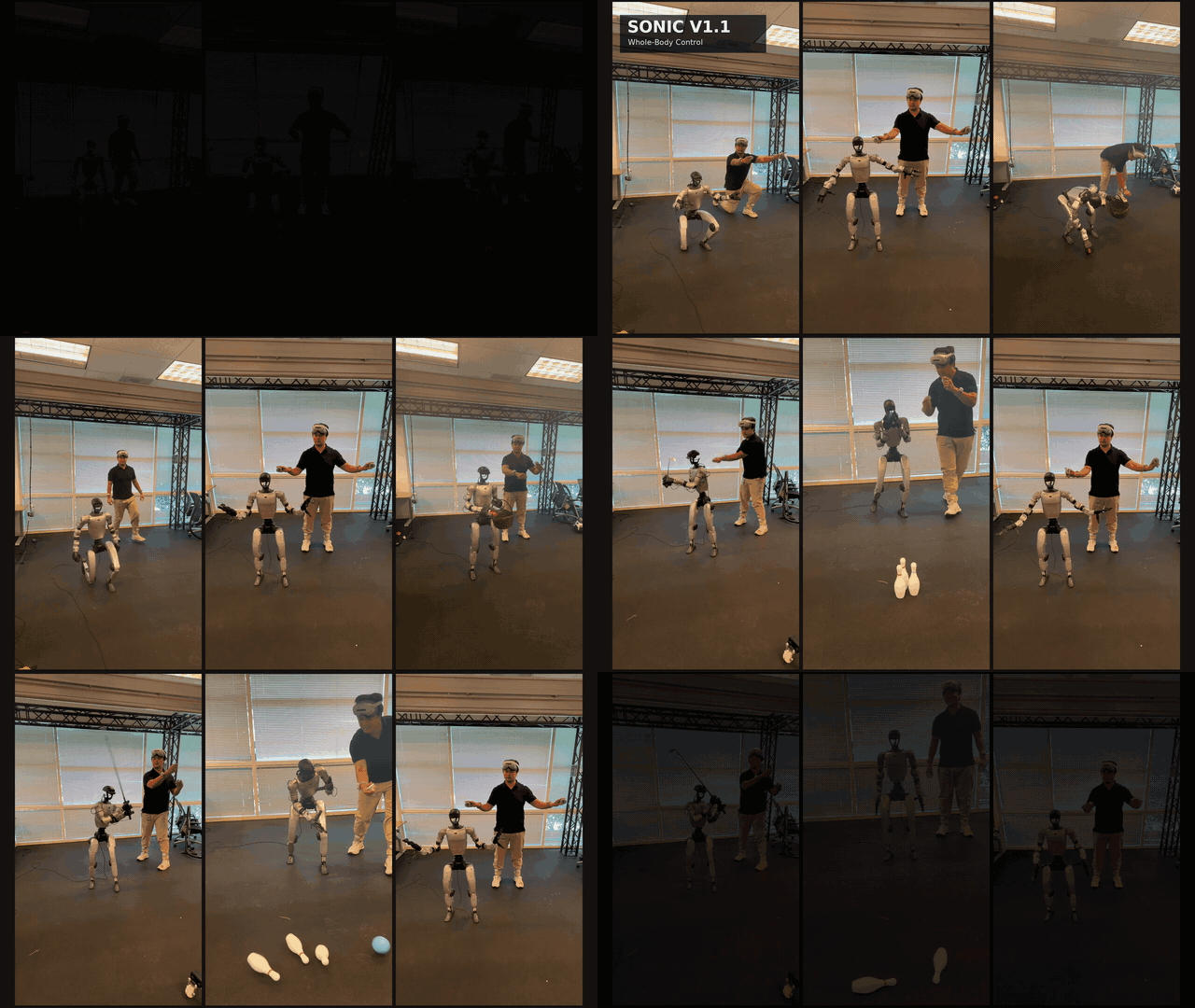
SONIC v1.1: Whole-body teleoperation mode with expressive wrist motion and dynamic movement.
All three models use the SONIC universal-token controller, produce 64-dimensional latent motion tokens, run the controller at 50 Hz, and support SMPL pose, G1 motion reference, and teleoperation inputs. Deployment uses C++ and TensorRT; the PyTorch checkpoints support Isaac Lab evaluation and continued training.
Note
The lookahead values describe the reference horizon presented to the controller. They are not measurements of total end-to-end teleoperation latency, which also includes sensing, networking, preprocessing, and inference.
Released Files#
Model |
Deployment files |
PyTorch and configuration files |
|---|---|---|
Default SONIC |
|
|
Low-latency teleoperation |
|
|
SONIC v1.1 |
|
|
The root config.json
is the canonical release manifest for the variants and shared artifacts. The
official downloader fetches and validates it before downloading model files.
All files are hosted in
nvidia/GEAR-SONIC. Model weights
are covered by the NVIDIA Open Model License.
Choosing a Model#
Use Default SONIC when you want the original release, the broadest compatibility with existing deployment setups, or the standard motion-tracking and planning controller.
Use Low-latency teleoperation when responsiveness to streamed SMPL, VR, or VLA commands is the priority. Its shorter reference horizon reduces commanded motion lookahead, but it does not remove latency elsewhere in the system.
Use SONIC v1.1 for robot-heading-normalized whole-body teleoperation or a SONIC-backed VLA policy trained against this controller. It retains the 10-frame SMPL horizon and was trained with wrist-pose augmentation.
Usage#
Install the Hugging Face dependency from the repository root:
pip install huggingface_hub
Default SONIC#
python download_from_hf.py

cd gear_sonic_deploy
./deploy.sh --input-type zmq_manager real
Low-Latency Teleoperation#
python download_from_hf.py --low-latency

cd gear_sonic_deploy
./deploy.sh \
    --cp policy/low_latency/model \
    --obs-config policy/low_latency/observation_config.yaml \
    --input-type zmq_manager \
    real
SONIC v1.1#
python download_from_hf.py --sonic-v1-1

cd gear_sonic_deploy
./deploy.sh \
    --cp policy/sonic_v1_1/model \
    --obs-config policy/sonic_v1_1/observation_config.yaml \
    --input-type zmq_manager \
    --motor-kp-scale 4,10=1.5 \
    --motor-kd-scale 4,10=1.5 \
    real
The gain flags are the tested v1.1 hardware tuning. Motor indices 4 and
10 are the left and right ankle-pitch motors; the additional stiffness
improves whole-body stability and observed wrist tracking. Scaling is opt-in.
Python VLA Launcher#
For the default model:
python gear_sonic/scripts/launch_inference.py \
    --camera-host 192.168.123.164 \
    --prompt "pick up the cup"
For the low-latency model:
python gear_sonic/scripts/launch_inference.py \
    --deploy-checkpoint policy/low_latency/model \
    --deploy-obs-config policy/low_latency/observation_config.yaml \
    --camera-host 192.168.123.164 \
    --prompt "pick up the cup"
For SONIC v1.1, replace the two policy/low_latency/ paths above with
policy/sonic_v1_1/ and add:
--deploy-motor-kp-scale 4,10=1.5
--deploy-motor-kd-scale 4,10=1.5
See Downloading Model Checkpoints for PyTorch checkpoint evaluation and additional download options.
Limitations and Safety#
The low-latency name refers to reduced controller reference lookahead, not a benchmark of total system latency.
SONIC v1.1 is not a low-latency checkpoint; it uses the 10-frame SMPL reference horizon.
Each ONNX encoder and decoder must be used with its matching observation configuration.
These checkpoints target the Unitree G1 embodiment.
Test in simulation before deployment and keep a safety operator ready to stop a physical robot.