

Retargeting SMPL motions with PyRoki#
This workflow covers retargeting SMPL humanoid motions from AMASS to robot morphologies (G1 and H1_2) using PyRoki, a trajectory optimization-based retargeting tool.
How Retargeting Works#
Unlike many common retargeters that solve inverse kinematics (IK) frame-by-frame, PyRoki performs trajectory-level kinematic optimization. This means:
Whole-trajectory optimization: Instead of solving each frame independently, PyRoki optimizes the entire motion trajectory at once. This makes it much easier to maintain temporal consistency and smoothness.
No sudden flips: With our modified PyRoki implementation, we almost never see failures of sudden motion flips and discontinuities. This is critical for large-scale data processing and training.
Multiple cost terms: The optimization balances several objectives simultaneously:
Local alignment (
local_alignment): Matches relative joint/keypoint positions and bone directions between source and targetGlobal alignment (
global_alignment): Matches absolute keypoint positions to robot link positions in world frameRoot smoothness (
root_smoothness): Penalizes jittery root motionJoint smoothness (
joint_smoothness): Penalizes jittery joint motionJoint limits (
limit_cost): Keeps joints within valid rangesJoint velocity limits (
joint_vel_limit): Prevents unrealistic joint speedsFoot contact (
foot_contact): When feet are in contact, penalizes foot movement and maintains ankle-toe height consistencyFoot tilt (
foot_tilt): Keeps feet flat when in contact
Fixed trajectory length: All motions are trimmed or padded to 15 seconds (450 frames at 30 FPS) for efficient JAX compilation and batch processing.
Overview#
The full retargeting pipeline from AMASS to robot:
Packaged AMASS MotionLib (.pt, SMPL format)
        │
        ▼ (extract_retargeting_input_keypoints_from_packaged_motionlib.py)
Keypoints (.npy files)
        │
        ├──────────────────────────────────────┐
        ▼                                      ▼
Retargeted robot motion               Contact labels from source
(batch_retarget_to_<robot>_from_keypoints.py)  (--save-contacts-only)
        │                                      │
        └──────────────────────────────────────┘
                        │
                        ▼ (convert_pyroki_retargeted_robot_motions_to_proto.py)
                ProtoMotions format (.motion)
                        │
                        ▼ (motion_lib.py)
                Packaged MotionLib (.pt)
Prerequisites#
Packaged AMASS MotionLib in SMPL format (see AMASS Data Preparation)
PyRoki installed in a separate Python environment (see below)
Installing PyRoki#
PyRoki requires a separate Python environment from ProtoMotions due to different JAX/CUDA dependencies. Install it as follows:
# Create a new environment for PyRoki
conda create -n pyroki python=3.10
conda activate pyroki

# Clone and install PyRoki
git clone https://github.com/chungmin99/pyroki.git
cd pyroki
pip install -e .
For more details, see the PyRoki GitHub repository.
Quick Start: Convenience Script#
For a one-click solution, use the provided bash script. Since ProtoMotions and PyRoki require separate Python environments, you must provide paths to both Python interpreters:
./scripts/retarget_amass_to_robot.sh <proto_python> <pyroki_python> <amass_pt_file> <robot_type> [skip_freq]
Arguments:
proto_python: Path to Python interpreter with ProtoMotions installedpyroki_python: Path to Python interpreter with PyRoki installedamass_pt_file: Path to packaged AMASS MotionLib .pt file (outputs saved in same directory)robot_type: Target robot (g1orh1_2)skip_freq: (Optional) Skip every N motions (default: 1 = all motions)
Example:
# Retarget every 50th motion to G1 (for quick testing)
./scripts/retarget_amass_to_robot.sh \
    ~/miniconda3/envs/protomotions/bin/python \
    ~/miniconda3/envs/pyroki/bin/python \
    /path/to/amass_train.pt \
    g1 50

# Retarget all motions to H1_2
./scripts/retarget_amass_to_robot.sh \
    ~/miniconda3/envs/protomotions/bin/python \
    ~/miniconda3/envs/pyroki/bin/python \
    /path/to/amass_train.pt \
    h1_2 1
The script runs all steps automatically and outputs the final MotionLib .pt file.
Output folder structure (outputs saved alongside input .pt file):
output_dir/
├── keypoints-for-retarget/   # Keypoints extracted from SMPL
├── pyroki-retargeted-g1/     # Retargeted robot motions
├── contacts/                 # Foot contact labels from source
├── proto-g1/                 # Robot proto format motions
└── proto-g1.pt               # Packaged robot MotionLib
Retargeting a Single Motion File#
To retarget a single .motion file (instead of a packaged .pt MotionLib), use
the dedicated script:
./scripts/retarget_single_motion_to_robot.sh <proto_python> <pyroki_python> <motion_file> <output_dir> <robot_type>
Arguments:
proto_python: Path to Python interpreter with ProtoMotions installedpyroki_python: Path to Python interpreter with PyRoki installedmotion_file: Path to input.motionfile (SMPL format)output_dir: Directory for all outputsrobot_type: Target robot (g1orh1_2)
Example:
./scripts/retarget_single_motion_to_robot.sh \
    ~/miniconda3/envs/protomotions/bin/python \
    ~/miniconda3/envs/pyroki/bin/python \
    /path/to/walk.motion \
    /path/to/output \
    g1
The script automatically:
Extracts keypoints from the SMPL motion
Runs PyRoki retargeting to the target robot
Extracts foot contact labels from the source motion
Converts to ProtoMotions format with contacts
Reports the output
.motionfile path
To visualize the result:
python examples/motion_libs_visualizer.py \
    --motion_files /path/to/output/proto-g1.pt \
    --robot g1 \
    --simulator isaacgym
Step-by-Step Guide#
Step 1: Extract Keypoints from Packaged MotionLib#
Extract simplified keypoints (pelvis, shoulders, elbows, wrists, hips, knees, ankles, feet, plus auxiliary points) from the packaged SMPL motions:
python data/scripts/extract_retargeting_input_keypoints_from_packaged_motionlib.py \
    /path/to/amass_train.pt \
    --output-path /path/to/output/keypoints-for-retarget/ \
    --skeleton-format smpl \
    --start-idx 0 \
    --skip-freq 15
Arguments:
--output-path: Directory for extracted keypoint.npyfiles--skeleton-format: Source skeleton format (smplfor AMASS)--start-idx: Starting motion index (default: 0)--skip-freq: Skip every N motions (use 15-35 for quick subset testing, 1 for all motions)
Tip
Use --skip-freq 50 or higher when first testing the pipeline to process
only a small subset of motions. Once verified, set --skip-freq 1 to
process all motions.
Step 2: Run PyRoki Retargeting#
Activate the PyRoki environment (separate from ProtoMotions) and run batch retargeting:
For G1:
conda activate pyroki  # Switch to PyRoki environment

python pyroki/batch_retarget_to_g1_from_keypoints.py \
    --keypoints-folder-path /path/to/output/keypoints-for-retarget/ \
    --output-dir /path/to/output/pyroki-retargeted-g1/ \
    --source-type smpl \
    --subsample-factor 1 \
    --no-visualize \
    --skip-existing
For H1_2:
python pyroki/batch_retarget_to_h1_2_from_keypoints.py \
    --keypoints-folder-path /path/to/output/keypoints-for-retarget/ \
    --output-dir /path/to/output/pyroki-retargeted-g1/ \
    --source-type smpl \
    --subsample-factor 1 \
    --no-visualize \
    --skip-existing
Arguments:
--keypoints-folder-path: Input directory with keypoint.npyfiles--output-dir: Output directory for retargeted motions (.npzfiles)--source-type: Source skeleton type (smplfor AMASS)--subsample-factor: Temporal subsampling (1 = no subsampling)--no-visualize: Skip visualization (required for batch processing)--skip-existing: Resume interrupted runs by skipping completed files
Step 3: Extract Contact Labels from Source Motions#
Foot contact labels should come from the source SMPL motions, not re-computed from retargeted robot motions. This is because the retargeting process can be imperfect, and source motion contacts are more reliable.
python pyroki/batch_retarget_to_g1_from_keypoints.py \
    --keypoints-folder-path /path/to/output/keypoints-for-retarget/ \
    --source-type smpl \
    --subsample-factor 1 \
    --save-contacts-only \
    --contacts-dir /path/to/output/contacts/ \
    --skip-existing
The --save-contacts-only flag skips retargeting and only extracts processed
foot contact labels from the source keypoints.
Step 4: Convert to ProtoMotions Format#
Convert retargeted motions to ProtoMotions format, incorporating the source contact labels:
python data/scripts/convert_pyroki_retargeted_robot_motions_to_proto.py \
    --retargeted-motion-dir /path/to/output/pyroki-retargeted-g1/ \
    --output-dir /path/to/output/proto-g1/ \
    --robot-type g1 \
    --contact-labels-dir /path/to/output/contacts/ \
    --apply-motion-filter \
    --force-remake
Arguments:
--retargeted-motion-dir: Directory with retargeted.npzfiles--output-dir: Output directory for.motionfiles--robot-type: Target robot (g1orh1_2)--contact-labels-dir: Directory with contact labels from Step 3--apply-motion-filter: Apply smoothing filter to reduce jitter--force-remake: Overwrite existing files
Note
The conversion script automatically adjusts the robot height (fix_height) to
ensure feet don’t penetrate the ground, using robot-specific foot offsets.
Step 5: Package into MotionLib#
Package the converted motions into a single .pt file:
python protomotions/components/motion_lib.py \
    --motion-path /path/to/output/proto-g1/ \
    --output-file /path/to/output/proto-g1.pt
Step 6: Verify with Motion Visualizer#
Before training, verify the retargeted motions look correct using the motion visualizer:
python examples/motion_libs_visualizer.py \
    --motion_files /path/to/output/proto-g1.pt \
    --robot g1 \
    --simulator isaacgym
The visualizer supports comparing multiple MotionLibs side-by-side:
python examples/motion_libs_visualizer.py \
    --motion_files /path/to/output/proto-g1.pt /path/to/reference.pt \
    --robot g1 \
    --simulator isaacgym
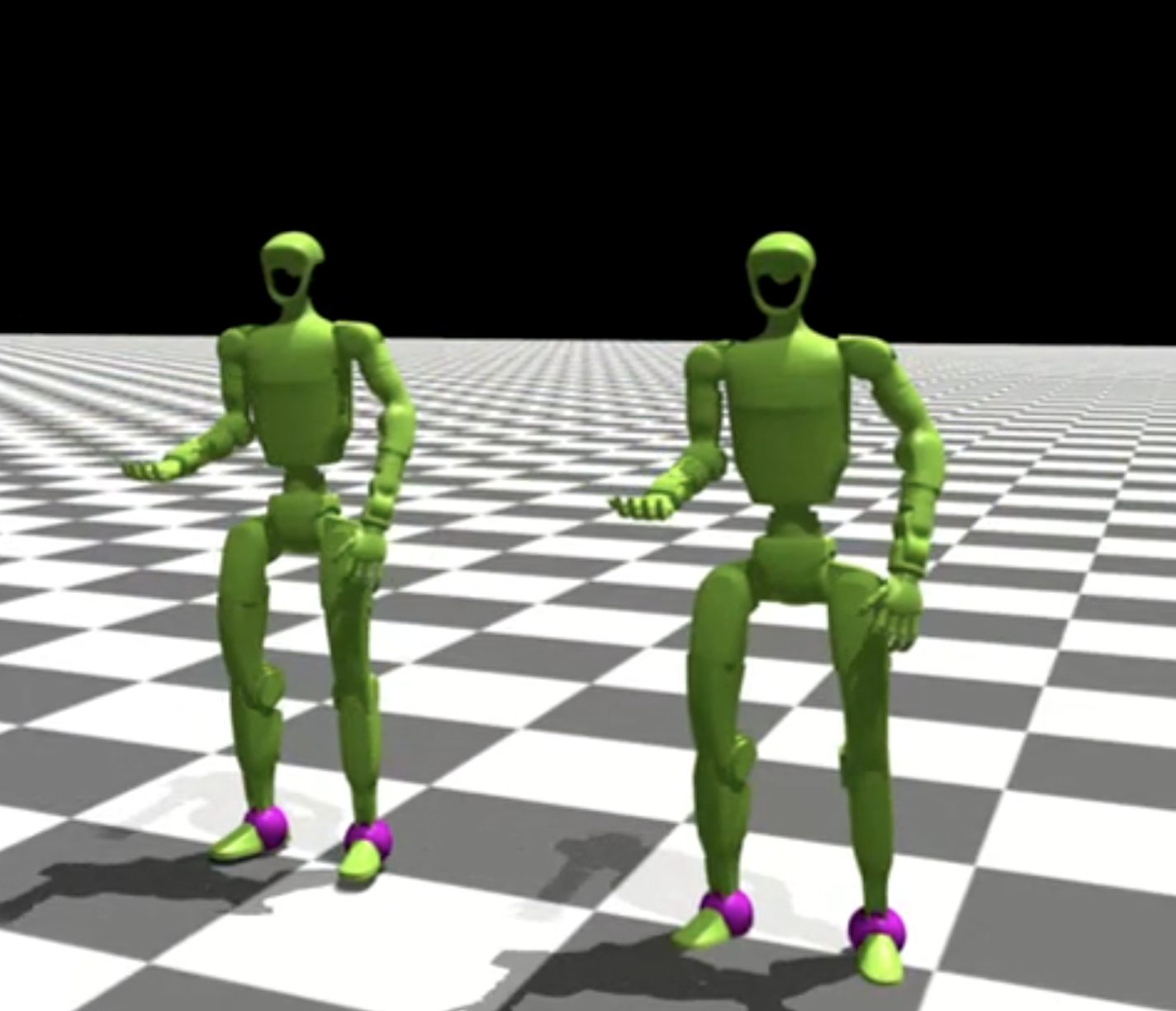
Controls:
R: Switch to next motion
1/2: Increase/decrease playback speed
3/4: Adjust smoothness threshold for highlighting
Adding a New Robot for Retargeting#
To retarget to a new robot, create a new retargeting script based on existing ones.
Comparing batch_retarget_to_g1_from_keypoints.py and
batch_retarget_to_h1_2_from_keypoints.py shows the key differences:
Link Name Mapping
Update the keypoint-to-link mapping in
get_humanoid_retarget_indices():# G1 example for human_name, g1_name in [ ("pelvis", "pelvis_contour_link"), ("left_hip", "left_hip_pitch_link"), ("left_knee", "left_knee_link"), ("left_ankle", "left_ankle_roll_link"), ("left_foot", "left_foot_link"), ("left_shoulder", "left_shoulder_pitch_link"), ("left_elbow", "left_elbow_link"), ("left_wrist", "left_wrist_yaw_link"), # ... right side similarly ]: # H1_2 example for human_name, h1_2_name in [ ("pelvis", "pelvis"), ("left_hip", "left_hip_yaw_link"), ("left_knee", "left_knee_link"), ("left_ankle", "left_ankle_roll_link"), ("left_foot", "left_foot_link"), ("left_shoulder", "left_shoulder_roll_link"), ("left_elbow", "left_elbow_link"), ("left_wrist", "left_wrist_yaw_link"), # ... right side similarly ]:
Keypoint Scaling
Different robots have different proportions. Adjust the scaling factors in
load_motion_data()to match your robot’s size:# G1 (smaller robot) if source_type == "smpl": simplified_keypoints_lower_body_local = ( simplified_keypoints_lower_body_local * onp.array([0.9, 0.9, 0.85])[None, None, :] ) simplified_keypoints_upper_body_local = ( simplified_keypoints_upper_body_local * onp.array([0.9, 0.9, 0.8])[None, None, :] ) # H1_2 (larger robot, closer to human scale) if source_type == "smpl": simplified_keypoints_lower_body_local = ( simplified_keypoints_lower_body_local * onp.array([1.1, 1.1, 1.1])[None, None, :] ) simplified_keypoints_upper_body_local = ( simplified_keypoints_upper_body_local * onp.array([1.1, 1.1, 1.0])[None, None, :] )
Take the vertical factor for the pelvis and legs from the robot/source pelvis-to-ankle drop, not from the hip-joint height. Knee bend is very sensitive to it: near a straight leg, a pelvis target only 1 cm too low already bends G1’s knees by about 20 degrees. Keep the x and y factors equal, so the scaling does not depend on which way the motion is heading.
The robot matches the pelvis keypoint with its pelvis origin. Keypoint extraction stores the SOMA pelvis keypoint 7 cm behind the Hips joint, so
load_motion_datamoves it back onto the joint withsoma_pelvis_keypoint_on_hipsfromprotomotions/utils/retargeting_keypoints.py. Call it in a new robot’s script too; otherwise every SOMA target lands about 7 cm too far forward relative to the pelvis.Auxiliary Point Offsets
Update hand and torso auxiliary point offsets in
pc_alignment_cost():# G1 hand auxiliary point left_hand_aux_pos = link_pos_left_wrist + link_rot_mat_left_wrist @ jnp.array( [0.0, 0.0, 0.14] # G1 specific offset ) # H1_2 hand auxiliary point left_hand_aux_pos = link_pos_left_wrist + link_rot_mat_left_wrist @ jnp.array( [0.0, 0.0, 0.2] # H1_2 specific offset )
URDF and Mesh Paths
Update default paths for your robot’s URDF and mesh files:
parser.add_argument(
    "--urdf-path",
    default=str(SCRIPT_DIR / "../protomotions/data/assets/urdf/for_retargeting/your_robot.urdf"),
)
parser.add_argument(
    "--mesh-dir",
    default=str(SCRIPT_DIR / "../protomotions/data/assets/mesh/YourRobot"),
)
Optimization Weights
Tune the optimization weights for your robot:
weights_dict = RetargetingWeights(
    local_alignment=1.0,
    global_alignment=4.0,  # G1: 4.0, H1_2: 3.0
    root_smoothness=1.0,
    joint_smoothness=4.0,
    self_collision=0.0,
    joint_rest_penalty=1.0,
    joint_vel_limit=50.0,
    foot_contact=30.0,
    foot_tilt=1.0,
)
Update Conversion Script
Add your robot type to
convert_pyroki_retargeted_robot_motions_to_proto.pyto handle robot-specific processing (joint ordering, height offsets, etc.).
Next Steps#
AMASS Data Preparation - Prepare AMASS data
SMPL Training on AMASS - Train SMPL policy on AMASS
Adding a Custom Robot - Add your own robot to ProtoMotions