

Developer Tips#
Quality of life tips for working with ProtoMotions.
Testing Simulator Setup#
Use random_pose_visualizer.py to verify a robot loads correctly:
python examples/random_pose_visualizer.py \
    --robot g1 \
    --simulator isaacgym
This runs the simulator with zero gravity and zero torque, writes a random
joint pose within the joint limits, and writes a fresh one every two seconds;
between re-poses the robot should hold still. --robot accepts any
registered robot name; a robot without an entry in the script’s own table is
drawn with neutral defaults. There is no key to press.
This is the first thing to test when adding a new robot or a new simulator backend.
Comparing Motion Libraries#
Use motion_libs_visualizer.py to compare ground truth vs learned motions:
python examples/motion_libs_visualizer.py \
    --motion_files gt_motions.pt predicted_motions.pt \
    --robot g1 \
    --simulator isaacgym
Features:
Side-by-side playback
Yellow markers highlight jittery body parts (high normalized jerk)
Purple markers highlight contact points with the ground
Smoothness metrics (normalized jerk, oscillation index)
Adjustable playback speed
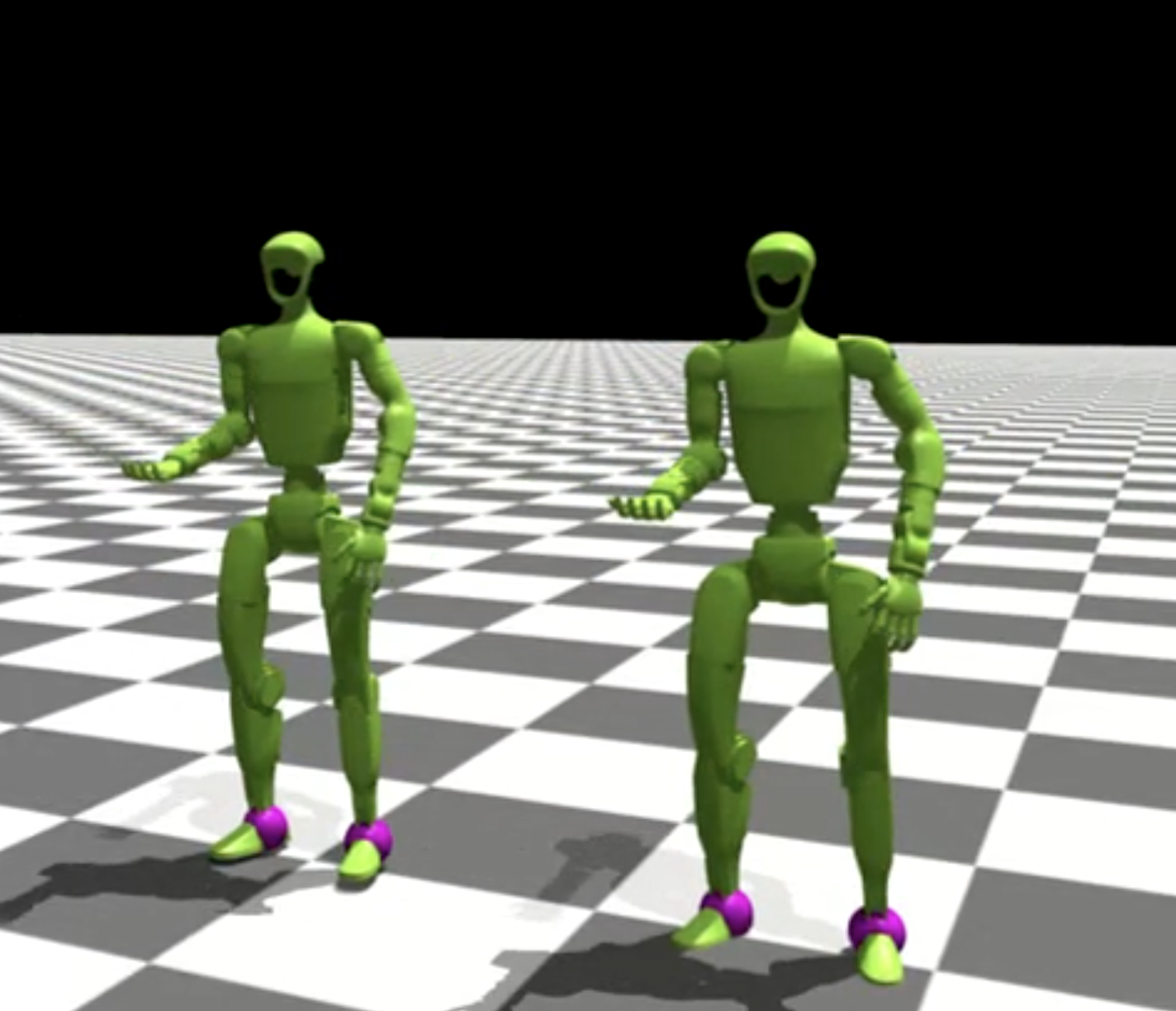
Saving predicted motions:
Run inference in full-eval mode to save the predicted motion library:
python protomotions/inference_agent.py \
    --checkpoint results/my_exp/last.ckpt \
    --simulator isaacgym \
    --full-eval \
    --headless \
    --num-envs 1024
Understanding Prioritized Sampling#
Motion imitation can sample difficult motions more often. The evaluator drives the weights; nothing in the training loop guesses difficulty from rewards.
How it works:
Every
eval_metrics_everyepochs the training loop callsevaluator.evaluate().MimicEvaluatorsweeps the motion library and returns anEvaluationResultwith logs, an optional score, the evaluated count and per-motionfailed/evaluatedmasks, after the environment and model state have been restored.The training loop then calls
evaluator.update_training_state(result).MimicEvaluatorupdates only evaluated motions. It multiplies successful motions’ weights bysuccess_discount ** eval_metrics_everyand divides failed motions’ weights byfailure_discount ** eval_metrics_every. A zero failure discount instead resets failed weights to 1. Updated weights are clamped tomin_motion_weight. These settings live inmotion_weights_rules; the discount fields are namedmotion_weights_update_success_discountandmotion_weights_update_failure_discount. Weight updates need at least onefailure_componentsentry.inference_agent.py --full-evalcallsevaluate()only, so offline evaluation never changes sampling weights.
See Evaluation components for configuring metrics and failure rules.
What to monitor:
Evaluation metrics are unweighted: each evaluated motion counts once.
eval/{name}/mean,eval/{name}/minandeval/{name}/maxfor every configuredmetric_componentsentry (eval/gt_error/meanin the evaluation guide’s example).eval/{name}/failure_ratefor everyfailure_componentsentry andeval/success_rateoverall.
Training rewards are collected under the current sampling weights, so a change in a training reward curve after an evaluation can reflect the new motion mix rather than a change in policy quality. Compare evaluation metrics instead.
Train Agent Modes#
--training-max-iterations N sets the absolute number of rollout and
optimization iterations for the experiment. Each iteration collects one
num_steps rollout from every environment and performs the configured
optimization updates. If an experiment is resumed at iteration 20 with a limit
of 100, training continues to iteration 100; it does not run 100 additional
iterations.
train_agent.py has three modes:
1. Fresh Start:
New experiment name → build configs from experiment file
python protomotions/train_agent.py \
    --experiment-name new_experiment \
    ...
2. Resume:
Same experiment name with existing checkpoint → load exact saved configs
# First run
python protomotions/train_agent.py --experiment-name my_exp ...

# Resume (uses saved configs, ignores CLI overrides!)
python protomotions/train_agent.py --experiment-name my_exp ...
Warning
CLI overrides (--overrides) are ignored during resume. The system
uses exactly the saved configs from the first run.
3. Warm Start:
--checkpoint with new experiment name → old weights, new configs
python protomotions/train_agent.py \
    --experiment-name new_exp_with_changes \
    --checkpoint results/old_exp/last.ckpt \
    ...
Create Config Only Mode#
Generate configs without training:
python protomotions/train_agent.py \
    --experiment-name migration_test \
    ... \
    --create-config-only
Useful for:
Migrating old checkpoints when config APIs change
Verifying configs before long training runs
Debugging config composition
Kinematic Playback for Debugging#
Test motion + scene alignment without physics:
python examples/env_kinematic_playback.py \
    --experiment-path examples/experiments/mimic/mlp_no_contact.py \
    --motion-file my_motions.pt \
    --robot-name g1 \
    --simulator isaacgym \
    --num-envs 1 \
    --scenes-file my_scenes.pt
--num-envs is required. The command uses the _no_contact mimic recipe
because it runs on IsaacGym, whose GPU pipeline reports one combined force per
body and so cannot run a recipe that declares contact bodies; on IsaacLab use
mimic/mlp.py.
This plays motions kinematically (sets poses directly, no simulation). Use to verify:
Motion data is correct
Scene objects are positioned correctly
Retargeting didn’t break anything