Fitting Spheres to Geometry
cuRobo represents robots and grasped objects as sets of spheres for collision checking. This page describes the available sphere fitting techniques.
Use Cases
Grasped objects: During pick-and-place, the grasped object must be checked for collisions with the world. cuRobo approximates it as spheres and attaches them to the robot’s kinematic model.
Robot links: Robot geometry is approximated with spheres for self-collision and world collision checking. See Build Robot Model for configuring robot spheres.
Entry Point
The main function is curobo.geom.sphere_fit.fit_spheres_to_mesh:
from curobo.geom.sphere_fit import fit_spheres_to_mesh, SphereFitType
import trimesh

mesh = trimesh.load("my_object.obj")

# Automatic sphere count with default density
result = fit_spheres_to_mesh(mesh)

# Explicit sphere count
result = fit_spheres_to_mesh(mesh, n_spheres=50)

# With quality metrics
result = fit_spheres_to_mesh(mesh, compute_metrics=True)
print(f"Coverage: {result.metrics.coverage:.2%}, Protrusion: {result.metrics.protrusion:.2%}")
Parameter |
Description |
|---|---|
|
Number of spheres to fit. When |
|
Density multiplier for auto sphere count (default |
|
Fitting algorithm (default |
|
Radius for surface-sampled spheres. Only affects |
|
Optimization iterations for |
|
When |
|
Half-plane constraint |
Fit Types
cuRobo provides three methods via curobo.geom.sphere_fit.SphereFitType:
Type |
Description |
|---|---|
|
Samples the mesh surface evenly with fixed-radius spheres. Fast fallback for thin or degenerate meshes. |
|
Voxelizes the bounding box, filters by SDF to keep interior voxels, and assigns inscribed radii. Good for convex shapes. |
|
Initialises with |
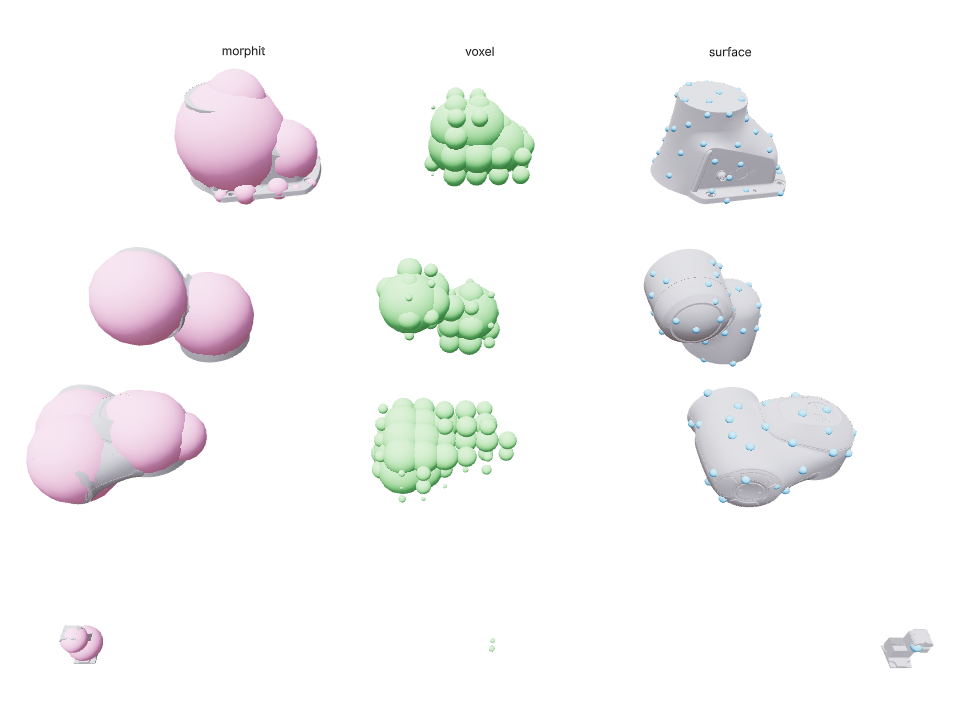
Comparison of the three fit types on robot link meshes. From left to right: MORPHIT (pink), VOXEL (green), SURFACE (blue).
To visually compare the fit types interactively, run the comparison demo:
python -m curobo.examples.reference.sphere_fit_comparison
This launches a Viser viewer showing each fit type as a column of coloured spheres next to the original mesh. You can customise the robot, links, and methods:
python -m curobo.examples.reference.sphere_fit_comparison --robot franka.yml
python -m curobo.examples.reference.sphere_fit_comparison --links panda_link0 panda_link7
python -m curobo.examples.reference.sphere_fit_comparison --methods surface voxel morphit
The fitting pipeline automatically handles degenerate cases:
Hollow/thin meshes: Watertight meshes with extremely low fill ratio are replaced with their convex hull before fitting.
Fallback chain: If the primary method produces no spheres, falls back to
VOXEL, thenSURFACE.
Result
curobo.geom.sphere_fit.SphereFitResult contains:
Field |
Description |
|---|---|
|
Sphere centre positions, shape |
|
Sphere radii, shape |
|
Number of fitted spheres. |
|
Wall-clock fitting time in seconds. |
Quality Metrics
When compute_metrics=True, the following fields are populated:
Metric |
Description |
|---|---|
|
Fraction of interior sample points covered by at least one sphere. |
|
Fraction of sphere-surface sample points outside the mesh. |
|
Mean distance (m) of protruding points to the mesh surface. |
|
95th-percentile protrusion distance (m). |
|
Mean gap (m) from mesh surface samples to nearest sphere surface. |
|
95th-percentile surface gap (m). |
|
Maximum gap (m) from mesh surface to nearest sphere. |
|
Total sphere volume divided by mesh volume. |
Inspecting Fit Quality
Pass --compute-metrics to the robot builder script to print a per-link
quality report after sphere fitting:
python -m curobo.examples.getting_started.build_robot_model \
    --urdf robot.urdf --asset-path meshes/ --output robot.yml \
    --compute-metrics
The same metrics are available programmatically via
builder.link_metrics (a dict of SphereFitMetrics).
Clip Planes
When a robot is mounted on a stand or bolted to the floor, base-link spheres
may protrude into the mounting surface. Pass --clip-link to prevent this:
python -m curobo.examples.getting_started.build_robot_model \
    --urdf robot.urdf --asset-path meshes/ --output robot.yml \
    --clip-link base_link z 0.0
This adds a half-plane constraint during MorphIt optimization (as a
differentiable loss term) and applies a hard clamp after fitting, so no sphere
on base_link extends below z=0 in link-local coordinates. The flag can
be repeated for multiple links.
Programmatically, pass clip_links to RobotBuilder.fit_collision_spheres:
builder.fit_collision_spheres(clip_links={"base_link": ("z", 0.0)})
Geometry Helper
Individual geometry objects also provide a convenience method for sphere fitting:
from curobo.geom.types import Capsule, WorldCfg

capsule = Capsule(
   name="capsule",
   radius=0.2,
   base=[0, 0, 0],
   tip=[0, 0, 0.5],
   pose=[0.0, 5, 0.0, 0.043, -0.471, 0.284, 0.834],
)

sph = capsule.get_bounding_spheres(n_spheres=500)
WorldCfg(spheres=sph).save_world_as_mesh("bounding_spheres.obj")