

Introduction#
cuTile Rust is a safe tile-based parallel programming model for Rust. Kernels map onto Tensor Cores, Tensor Memory Accelerators, and other architecture-specific units automatically, so the same source runs across NVIDIA GPU architectures.
On the host side, the API handles device tensor allocation, partitioning mutable tensors for safe parallel access, and Arc-wrapped sharing for read-only tensors. Kernel launchers are constructed from #[cutile::entry] functions and JIT-compiled at first use; subsequent launches use the cached binary. Execution is asynchronous.
A First Kernel#
cuTile Rust kernels are GPU programs that execute concurrently across a logical grid of tile blocks. The #[cutile::entry()] attribute marks a Rust function as an entry point: a function you can call from your Rust program that executes on the GPU.
use cutile::prelude::*;
use my_module::add;

#[cutile::module]
mod my_module {
    use cutile::core::*;

    #[cutile::entry()]
    fn add<const S: [i32; 2]>(
        z: &mut Tensor<f32, S>,
        x: &Tensor<f32, { [-1, -1] }>,
        y: &Tensor<f32, { [-1, -1] }>,
    ) {
        let tile_x = load_tile_like(x, z);
        let tile_y = load_tile_like(y, z);
        z.store(tile_x + tile_y);
    }
}

fn main() -> Result<(), cuda_async::error::DeviceError> {
    let device = cuda_core::Device::new(0)?;
    let stream = device.new_stream()?;

    let x = api::ones::<f32>(&[32, 32]).sync_on(&stream)?;
    let y = api::ones::<f32>(&[32, 32]).sync_on(&stream)?;
    let mut z = api::zeros::<f32>(&[32, 32]).sync_on(&stream)?;

    let _ = add((&mut z).partition([4, 4]), &x, &y).sync_on(&stream)?;
    Ok(())
}
Here, main is host Rust code: it runs on the CPU, allocates tensors, and launches work. The add function is device Rust code because it is marked with #[cutile::entry()]; when main first calls add(...), cuTile Rust JIT-compiles that function into optimized GPU code. The #[cutile::module] macro makes my_module expose the generated host-side APIs for launching add.
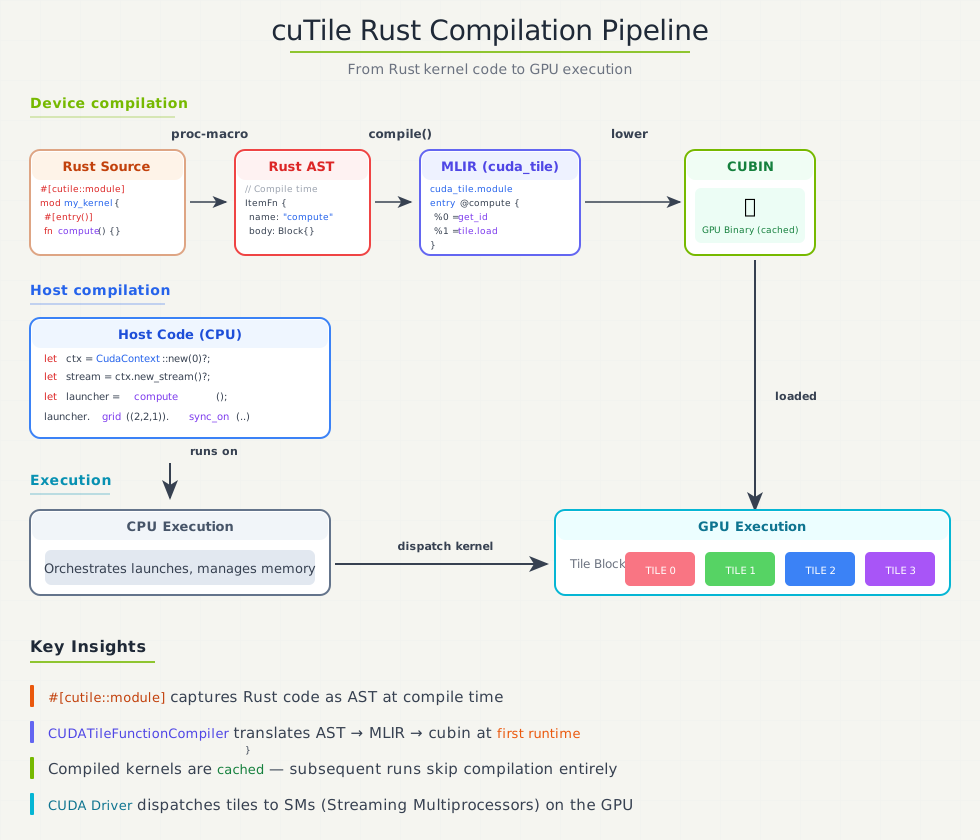
At first call, the pipeline transforms the entry function through Rust AST → MLIR → cubin. Subsequent calls reuse the cached binary, so JIT overhead is paid once per unique specialization.
Kernel Arguments and Launching#
On the host side, the generated launcher accepts several forms for each kernel parameter:
Kernel param |
Host input |
What the kernel sees |
|---|---|---|
|
|
|
|
|
|
Scalar ( |
Same scalar |
Same scalar |
Partitioning splits a tensor into disjoint regions with a fixed tile shape, such as partition([4, 4]) for a 2D tensor. Each tile block receives one partition element, which is how cuTile Rust gives the kernel mutable access to one region at a time while keeping writes non-overlapping.
The borrow-based form (&Tensor, Partition<&mut Tensor>) lets you pass tensors without moving them. The kernel writes through the borrow — no unpartition() or return capture needed.
The simplest launch pattern borrows everything:
let x = api::ones::<f32>(&[32, 32]).sync_on(&stream)?;
let y = api::ones::<f32>(&[32, 32]).sync_on(&stream)?;
let mut z = api::zeros::<f32>(&[32, 32]).sync_on(&stream)?;

// Borrow-based: z is written in place.
let _ = add((&mut z).partition([4, 4]), &x, &y).sync_on(&stream)?;
The launcher also accepts lazy DeviceOp arguments — everything stays lazy until .sync() or .await:
let z = api::zeros(&[32, 32]).partition([4, 4]);
let x = api::ones::<f32>(&[32, 32]);
let y = api::ones::<f32>(&[32, 32]);

let (_z, _x, _y) = add(z, x, y).sync()?;
For chaining, use .then() to compose operations on the same stream:
let result = allocate()
    .then(|buf| fill_kernel(buf))
    .then(|buf| process_kernel(buf))
    .sync()?;
Tensors and Tiles#
Kernels move data between Tensors and Tiles using operations like load_tile and store. Both are tensor-like data structures: each has a specific shape (the number of elements along each axis) and a dtype (the data type of elements). The difference is where they live and what you can do with them.
Tensors (Global Memory)#
Tensors are multi-dimensional arrays stored in global memory (HBM). They are:
Kernel arguments: passed as
&mut Tensor<E, S>for writable outputs or&Tensor<E, S>for read-only inputs.Physical storage: strided memory layouts in GPU global memory.
Limited operations: within kernel code, tensors mainly support loading and storing data as tiles. Direct arithmetic is not supported.
External data: Candle tensors and other GPU buffers can be passed as tensors from host code to kernels via kernel arguments.
// Tensor parameters in kernel signature
fn kernel(
    output: &mut Tensor<f32, S>,      // Mutable tensor (can store to)
    input: &Tensor<f32, {[-1, -1]}>   // Immutable tensor (read-only)
) { ... }
Tiles#
Tiles are immutable multi-dimensional array fragments that live in GPU registers during kernel execution. They are:
Immutable: operations create new tiles rather than modifying existing ones.
Compiler-managed storage: tile data lives in registers. The compiler handles shared memory staging and other memory hierarchy details automatically.
Compile-time static shapes: tile dimensions must be compile-time constants, often powers of two for optimal performance.
Rich operations: elementwise arithmetic, matrix multiplication, reduction, shape manipulation, and more.
// Tiles are created and transformed, never mutated
let tile_a = load_tile_like(a, output);    // Load creates a tile
let tile_b = load_tile_like(b, output);    // Another tile
let result_tile = tile_a + tile_b;            // New tile from operation
output.store(result_tile);                     // Store tile to tensor
The Load → Compute → Store Pattern#
Every cuTile Rust kernel follows the same fundamental pattern:
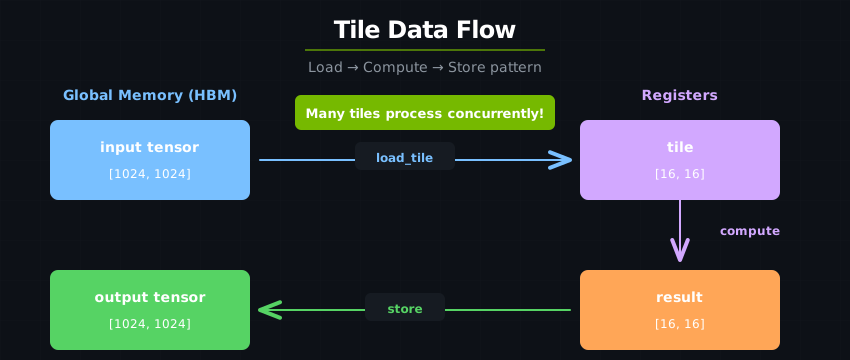
Load: Move data from global memory (Tensor) into tiles
Compute: Perform operations on tiles
Store: Write results from tiles back to global memory (Tensor)
This is key to performance: global memory is slow compared to on-chip resources. By loading once, computing many operations, and storing once, we maximize the compute-to-memory ratio.
Use cases#
Use cuTile Rust when:
You need custom GPU kernels not available in libraries
You want to fuse multiple operations for performance
You’re building performance-critical ML infrastructure
You need Rust’s safety guarantees on GPU code
Don’t use cuTile Rust when:
Standard library operations (cuBLAS, cuDNN) suffice
You need maximum portability across GPU vendors
Your team is deeply invested in the CUDA C++ ecosystem
Note: For algorithms requiring warp-level primitives or custom CUDA C++ kernels, see Interoperability; custom kernels can participate in the same
DeviceOpexecution model as your tile kernels.
Continue to Thinking in Tiles, or jump straight to the Tutorials.