

1. Hello World#
Tile kernels are functions which run as N copies concurrently and in parallel when invoked. The primary difference between tile-based kernels and CUDA C++ kernels is the basic unit of execution: a tile-block, which expresses the computation performed by a single logical tile thread operating over a multi-dimensional tile of data.
Note: The distinction between parallel execution and concurrent execution is intentional: The CUDA runtime executes tile kernels concurrently, many of which may execute in parallel. While some support for inter-tile communication is possible, in-depth knowledge of the CUDA runtime is required to achieve this.
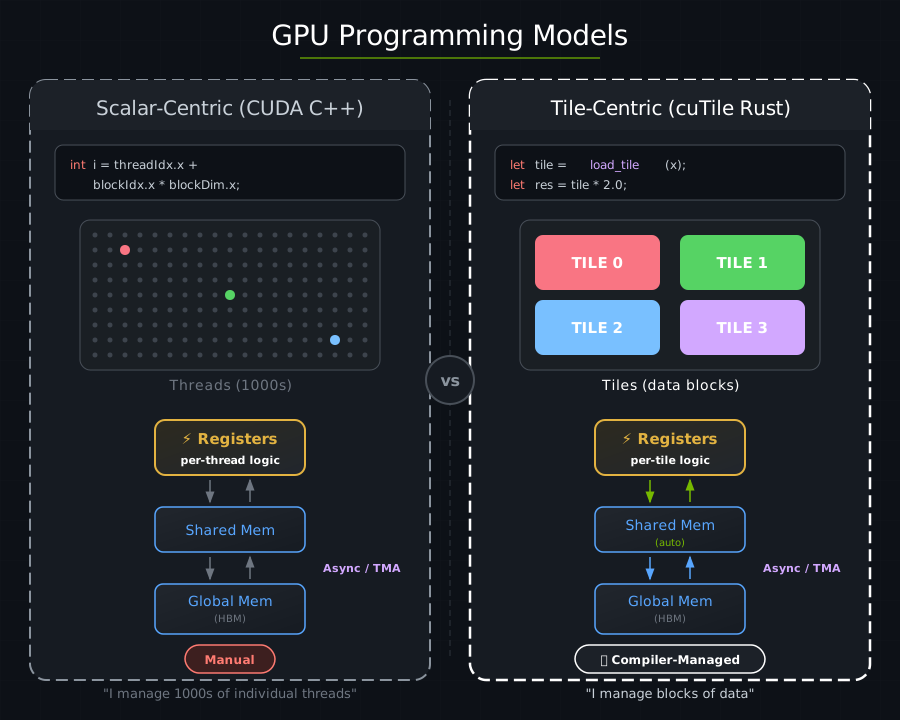
Here is a kernel that prints “hello” from the GPU:
use cuda_async::device_operation::DeviceOp;
use cuda_core::Device;
use cutile;
use cutile::error::Error;
use cutile::tile_kernel::TileKernel;

#[cutile::module]
mod hello_world_module {
    use cutile::core::*;

    #[cutile::entry()]
    fn hello_world_kernel() {
        let pids: (i32, i32, i32) = get_tile_block_id();
        let npids: (i32, i32, i32) = get_num_tile_blocks();
        cuda_tile_print!(
            "Hello from tile <{}, {}, {}> in a grid of <{}, {}, {}> tiles!\n",
            pids.0, pids.1, pids.2,
            npids.0, npids.1, npids.2
        );
    }
}

use hello_world_module::hello_world_kernel;

fn main() -> Result<(), Error> {
    let device = Device::new(0)?;
    let stream = device.new_stream()?;
    let launcher = hello_world_kernel();
    launcher.grid((2, 2, 1)).sync_on(&stream)?;
    Ok(())
}
Output:
Hello from tile <0, 0, 0> in a grid of <2, 2, 1> tiles!
Hello from tile <1, 0, 0> in a grid of <2, 2, 1> tiles!
Hello from tile <0, 1, 0> in a grid of <2, 2, 1> tiles!
Hello from tile <1, 1, 0> in a grid of <2, 2, 1> tiles!
Four tile threads were executed by the CUDA runtime, each printing its own coordinates.
GPU vs. CPU Code#
cutile-rs programs have two parts: code that runs on the GPU, or the device-side, and code that runs on the CPU, or the host-side.
The following snippet will JIT-compile to the GPU when executed from the host-side:
#[cutile::module]
mod hello_world_module {
    use cutile::core::*;

    #[cutile::entry()]
    fn hello_world_kernel() {
        // This code runs on the GPU!
    }
}
#[cutile::module]marks a module as containing GPU code.#[cutile::entry()]marks a function as a kernel entry point.
The kernel function runs many times concurrently and in parallel — once for each coordinate in the kernel launch grid.
The following host-side code will launch the device-side code:
fn main() -> Result<(), Error> {
    let device = Device::new(0)?;             // Connect to GPU
    let stream = device.new_stream()?;             // Create a work queue
    let launcher = hello_world_kernel();   // Get the kernel launcher
    launcher.grid((2, 2, 1)).sync_on(&stream)?; // Launch 2×2×1 = 4 tiles
    Ok(())
}
Host-side code sets up the GPU, specifies the kernel launch grid, and launches the kernel.
Tile IDs#
Each tile is assigned an ID corresponding to a coordinate within the 3-dimensional launch grid:
let pids: (i32, i32, i32) = get_tile_block_id();    // This thread's (x, y, z) coordinates
let npids: (i32, i32, i32) = get_num_tile_blocks(); // The grid dimensions
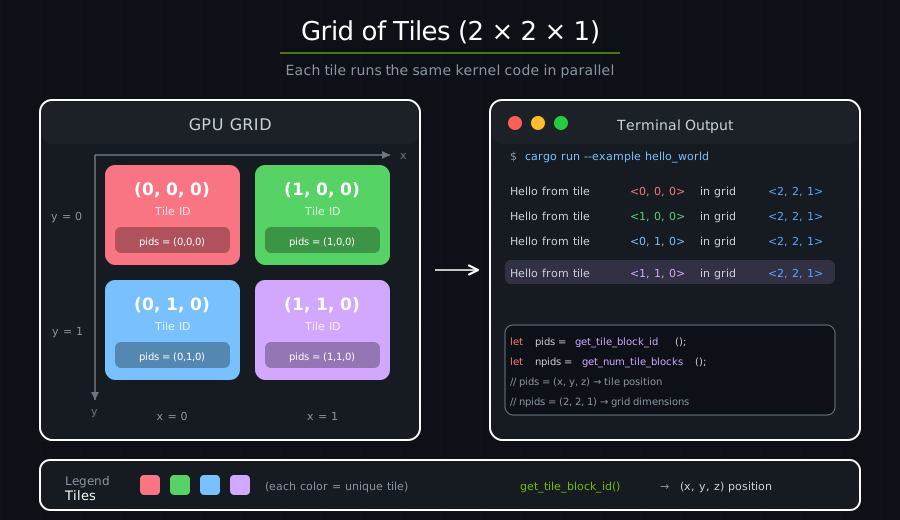
Each tile runs the same code but with different coordinates. This is how tiles divide up work — each tile handles a different piece of data based on its ID.
Under the hood#
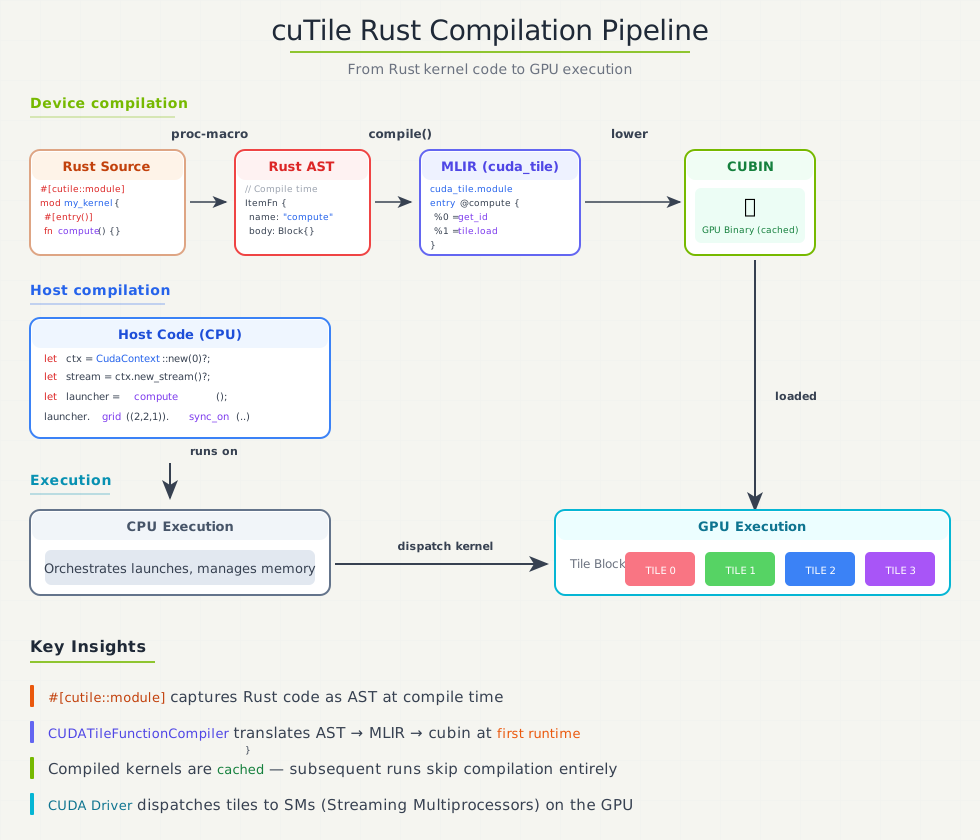
At compile time:
#[cutile::module]captures your Rust code as an AST.At first kernel launch: The AST is compiled to MLIR → cubin (GPU binary).
Cached: The cubin is cached, so subsequent runs are instant.
Launch: 4 tile threads are dispatched to the GPU.
Execution: All 4 tile threads run concurrently, each printing its coordinates.
Key Takeaways#
Concept |
What It Means |
|---|---|
Tile threads run concurrently |
You launch N tile threads, they all execute concurrently |
Tile threads are assigned an ID |
Each tile uses its ID to work on different data |
Host orchestrates |
CPU code decides grid shape and launches work |
Same code, different data |
The kernel is written once and executed by many tile threads |
Exercise 1: Change the Grid Size#
Modify the grid to (3, 3, 1). How many messages do you see?
launcher.grid((3, 3, 1)).sync_on(&stream)?;
Answer
You should see 9 messages (3 × 3 × 1 = 9 tile threads).
Exercise 2: Use the Z Dimension#
Try (2, 2, 2) for a 3D grid. What changes?
Answer
You’ll see 8 messages. The z coordinate will now vary from 0 to 1.
Exercise 3: Calculate Total Tiles#
Modify the kernel to also print the total number of tile threads.
Answer
let total = npids.0 * npids.1 * npids.2;
cuda_tile_print!(
    "Tile <{}, {}, {}> of {} total tiles\n",
    pids.0, pids.1, pids.2, total
);