

7. Intro to Async Execution#
Note: While async concepts are taught using the
tokioruntime, any async runtime can be used.
The sync API blocks the CPU until the GPU finishes:
let launcher = hello_world_kernel();
launcher.grid((2, 2, 1)).sync_on(&stream)?;  // CPU waits here!
// CPU blocked until GPU finishes
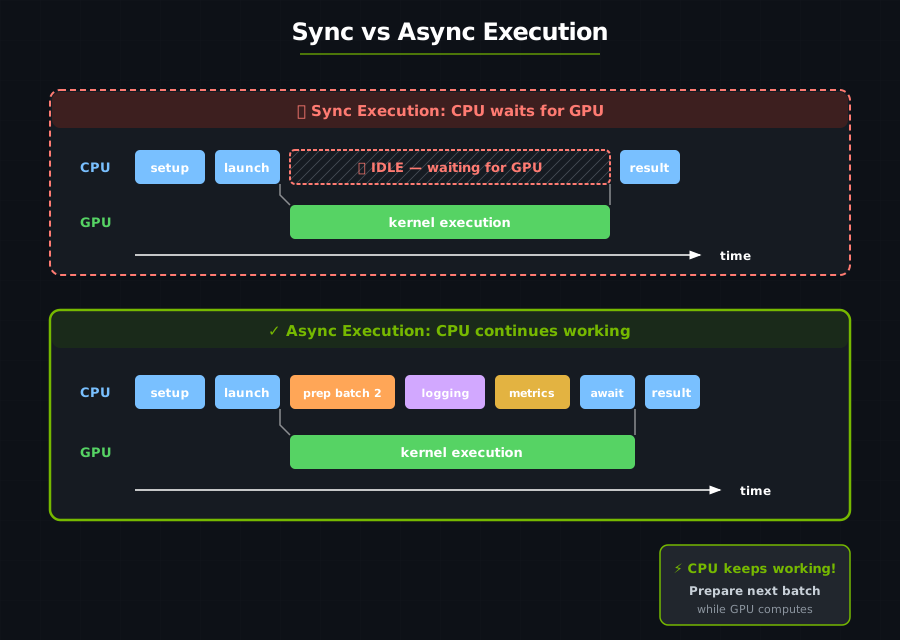
With async, the CPU can do other work while the GPU computes:
Preparing the next batch while the current one computes.
Pipelining multiple operations.
Overlapping data transfer with computation.
Multi-GPU coordination.
DeviceOp#
In cutile, GPU work is represented as a DeviceOp — a description of work to be done, not yet executed:
DeviceOpdescribes the work..awaitor.sync_on(.)executes it directly;tokio::spawncan run the future produced byinto_future()or.schedule(...).
// This creates a DeviceOp, but doesn't execute yet!
let tensor_op = api::ones(&[1024, 1024]);  // Returns impl DeviceOp

// Nothing has happened on the GPU yet...

// NOW it executes:
let tensor: Tensor<f32> = tensor_op.sync_on(&stream)?;  // Sync API
// or
let tensor: Tensor<f32> = tensor_op.await?;             // Async API
Sync vs Async APIs#
In cutile, a DeviceOp can be executed with either sync or async APIs. Given a particular operation op:
API |
Description |
|---|---|
|
Immediately executes |
|
Immediately executes |
|
Immediately executes |
|
Submits the operation’s future to the async runtime, returning a handle that can later be awaited. Non-blocking. Can only be called from within an async context. |
Note: An async context is any code appearing in a block defined with the
asynckeyword, e.g.async fn ...,async { ... },async || { ... }.
Async Vector Addition#
use cutile::api::{ones, zeros};
use cutile::tensor::{Tensor, ToHostVec, Unpartition};
use cutile::tile_kernel::{PartitionOp, TileKernel, ToHostVecOp};
use cuda_async::device_operation::*;
use std::sync::Arc;

#[cutile::module]
mod async_add_module {
    use cutile::core::*;

    #[cutile::entry()]
    fn add<const S: [i32; 2]>(
        z: &mut Tensor<f32, S>,
        x: &Tensor<f32, {[-1, -1]}>,
        y: &Tensor<f32, {[-1, -1]}>
    ) {
        let tile_x = load_tile_like(x, z);
        let tile_y = load_tile_like(y, z);
        z.store(tile_x + tile_y);
    }
}

use async_add_module::add;

#[tokio::main]
async fn main() -> Result<(), DeviceError> {
    let x: Arc<Tensor<f32>> = ones(&[32, 32]).map(Into::into).await?;
    let y: Arc<Tensor<f32>> = ones(&[32, 32]).map(Into::into).await?;

    // Unified launcher: pass output partition and inputs directly.
    let z_host: Vec<f32> = add(
        zeros(&[32, 32]).partition([4, 4]),  // Output, partitioned into tiles
        x,                                    // Input x (Arc<Tensor> via IntoDeviceOp)
        y,                                    // Input y
    )
    .first()
    .unpartition()
    .to_host_vec()
    .await?;
    println!("z[0] = {} (expected 2.0)", z_host[0]);
    Ok(())
}
Output:
z[0] = 2 (expected 2.0)
Overlapping Work with Spawn#
.await lets the programmer control when to execute work, but it blocks the enclosing async context — no further code in that async block runs until the awaited operation completes. (The underlying thread is freed and can run other tasks in the meantime, but this async context is suspended.) tokio::spawn converts a future into a concurrently executing task, returning a non-blocking handle that can later be awaited to retrieve the result.
#[tokio::main]
async fn main() -> Result<(), DeviceError> {
    let batch1_op = prepare_batch(1);  // Returns DeviceOp
    let batch2_op = prepare_batch(2);  // Returns DeviceOp

    let batch1 = batch1_op.await?;

    let result1_op = process_kernel(batch1);
    let result1_handle = tokio::spawn(result1_op.into_future());  // Non-blocking

    // batch 2 data can be prepared while batch 1's kernel runs
    let batch2 = batch2_op.await?;

    let result2 = process_kernel(batch2).await?;

    let result1 = result1_handle.await.expect("task panicked")?;
    Ok(())
}
Composing DeviceOps#
Unified Kernel Launcher#
The kernel launcher accepts both DeviceOp and plain values directly — no zip! needed:
// Pass output partition and inputs directly.
let result = kernel(output_op.partition([4, 4]), input1, input2)
    .first()           // Extract the output
    .unpartition()
    .await?;
zip! — Combine Operations Manually#
For cases where you need explicit control, zip! combines multiple DeviceOps into a tuple:
use cuda_async::device_operation::*;

let combined = zip!(op_a, op_b, op_c);
let (a, b, c) = combined.await?;
Choosing between sync and async#
Scenario |
Use Sync |
Use Async |
|---|---|---|
Simple scripts |
✓ |
|
Interactive exploration |
✓ |
|
Production pipelines |
✓ |
|
Multi-batch processing |
✓ |
|
Multi-GPU workloads |
✓ |
|
Overlapping compute/transfer |
✓ |
Start with sync for learning, move to async for production.
Borrowed Inputs and Spawn Safety#
Kernel &Tensor params accept three input forms: Tensor<T>, Arc<Tensor<T>>,
and &Tensor<T>. Borrowed inputs (&Tensor<T>) work with .sync_on() and
.await, but the compiler rejects them with tokio::spawn:
let weights: Tensor<f32> = api::ones(&[1024]).sync_on(&stream)?;

// OK — borrow is contained in the sync call.
let result = my_kernel(out, &weights).sync_on(&stream)?;

// OK — borrow checker ensures weights outlives the await.
let result = my_kernel(out, &weights).await?;

// COMPILE ERROR — &weights is not 'static, so the future can't be spawned.
let handle = tokio::spawn(my_kernel(out, &weights).into_future());
//                                       ^^^^^^^^ borrowed value does not live long enough
This is enforced at compile time by Rust’s lifetime system. If you need to
spawn, use Arc<Tensor<T>> instead:
let weights: Arc<Tensor<f32>> = api::ones(&[1024]).sync_on(&stream)?.into();
let handle = tokio::spawn(my_kernel(out, weights).into_future());  // OK — Arc is 'static
Key Takeaways#
Concept |
What It Means |
|---|---|
DeviceOp |
A description of GPU work, not yet executed |
.await |
Execute the operation and get the result |
Async enables overlap |
CPU can do work while GPU computes |
Unified launcher |
Kernel functions accept DeviceOps and plain values directly |
zip! |
Combine multiple operations into a tuple |
.then() |
Chain follow-up work on the same stream |
Exercise 1: Async SAXPY#
Convert the SAXPY kernel to use the async API.
Exercise 2: Parallel Tensor Creation#
Use zip! to create 4 tensors in parallel.
Answer
let (a, b, c, d) = zip!(
    ones(&[100, 100]).map(Into::into),
    zeros(&[100, 100]).map(Into::into),
    randn(0.0, 1.0, [100, 100], None).map(Into::into),
    arange(10000).map(Into::into)
).await?;
Exercise 3: Measure the Difference#
Time a sync version vs. an async version with overlapped work. Use std::time::Instant to measure.
See also#
Device Operations — full treatment of
DeviceOp, streams, and schedulingHost API — combinator signatures (
.then(),.shared(),unzip,zip!) and the full host-side API