

Where Data Lives#
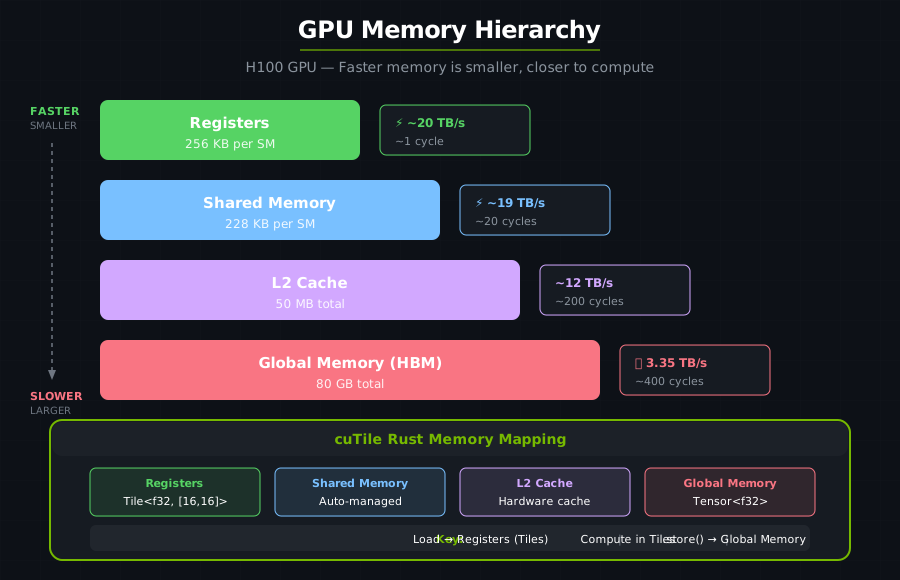
Understanding GPU memory is essential for writing fast kernels. The key insight: data locality determines performance. Modern NVIDIA GPUs have a multi-level memory hierarchy — faster memory is smaller; larger memory is slower. Writing a fast kernel means keeping the working set high in the pyramid.
The Memory Hierarchy#
Global Memory (HBM)#
What: High Bandwidth Memory, the GPU’s main memory
Size: Varies by GPU model (e.g., 80 GB on H100)
Bandwidth: High bandwidth (e.g., 3 TB/s on H100 SXM5) but highest latency of any memory level
Latency: ~400 cycles
Access: All tile blocks can access all locations
// Tensors live in global memory
let x: Arc<Tensor<f32>> = ones(&[1024, 1024]).map(Into::into).sync_on(&stream)?;
Coalesce memory accesses, minimize round-trips, and load once to use many times.
L2 Cache#
What: Hardware-managed cache between HBM and SMs
Size: ~50 MB (H100)
Bandwidth: Several times faster than HBM
Latency: ~200 cycles
cuTile Rust automatically benefits from L2 when you reuse data across tiles, access memory in predictable patterns, and keep working sets small.
Registers (RMEM)#
What: Fastest storage on the GPU, private to each thread within a tile block
Size: 256 KB per SM (64K 32-bit registers on H100)
Bandwidth: Fastest (near-zero latency)
Latency: ~1 cycle
Scope: Private to each thread within a tile block
In cuTile Rust, Tile<E, S> data lives in registers during computation. You load data from global memory (HBM) into tiles, compute on tiles, and store results back:
let tile: Tile<f32, {[16, 16]}> = load_tile_like(input, output);
// 'tile' lives in registers — loaded from HBM, computed on in registers
Memory Level |
Size |
Latency |
Use For |
|---|---|---|---|
Registers |
256KB/SM |
~1 cycle |
Active computation |
Shared Mem |
228KB/SM |
~20 cycles |
Block-level sharing |
L2 Cache |
~50 MB |
~200 cycles |
Automatic caching |
HBM |
Varies by GPU |
~400 cycles |
Large data storage |
Data Movement and Access Patterns#
The fundamental pattern is Load → Compute → Store:
Load from global memory (HBM) into tiles
Compute on tiles
Store results back to global memory (HBM)
You only interact with global memory — the Tile IR runtime decides how to map your tiles onto the hardware memory hierarchy (registers, shared memory, caches) for optimal performance.
#[cutile::entry()]
fn kernel(output: &mut Tensor<f32, S>, input: &Tensor<f32, {[-1, -1]}>) {
    // 1. Load: HBM → Tile
    let tile = load_tile_like(input, output);

    // 2. Compute on tile
    let result = tile * 2.0 + 1.0;

    // 3. Store: Tile → HBM
    output.store(result);
}
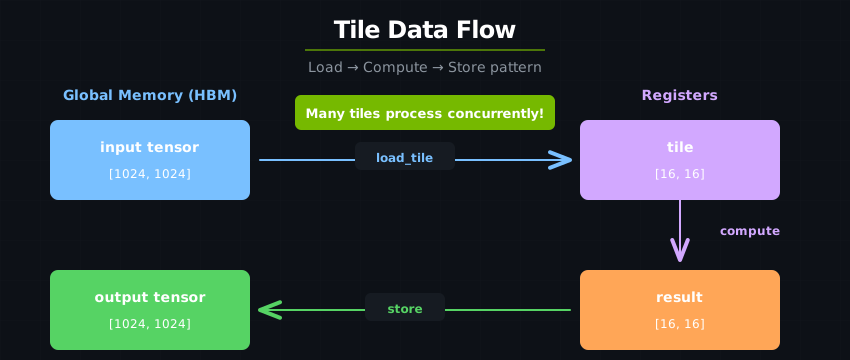
Partitioning logically divides a tensor into a grid of equally sized sub-regions, each processed by one tile block:
// 1024×1024 tensor, processed as 16×16 tiles
let output = zeros(&[1024, 1024])
    .partition([16, 16]);  // Creates 64×64 = 4096 tiles

// Each tile knows its position
// Tile (i, j) processes output[i*16:(i+1)*16, j*16:(j+1)*16]
When the underlying threads within a tile block access adjacent memory locations, the hardware combines them into a single wide memory transaction — this is coalesced access:
Thread 0: memory[0]
Thread 1: memory[1]
Thread 2: memory[2]
...
Thread 31: memory[31]

→ Single 128-byte transaction! Efficient!
cuTile Rust’s tile load operations automatically generate coalesced access patterns: the compiler maps tile elements to threads in a way that maximizes memory throughput. This is a key advantage of the tile programming model — you choose tile shapes and access patterns, and the compiler handles thread-level coalescing.
When threads access memory with large gaps between addresses, each access becomes a separate transaction — strided access:
Thread 0: memory[0]
Thread 1: memory[1024]
Thread 2: memory[2048]
...

→ Many separate transactions! Slow!
Warning
Strided access can reduce effective bandwidth by 32x or more. Use tile operations and row-major access patterns to maintain coalesced access.
Arithmetic Intensity#
Arithmetic intensity is operations per byte of memory access. Higher is better — it means more compute per memory transaction, which is how you stay ahead of bandwidth limits.
A kernel is memory-bound when bandwidth limits throughput (low arithmetic intensity):
// Element-wise add: 3 memory ops, 1 compute op
fn add<const S: [i32; 2]>(
    z: &mut Tensor<f32, S>,
    x: &Tensor<f32, {[-1, -1]}>,
    y: &Tensor<f32, {[-1, -1]}>
) {
    let tx = load_tile_like(x, z);  // 1 read
    let ty = load_tile_like(y, z);  // 1 read
    z.store(tx + ty);                  // 1 write, 1 add
}
// Arithmetic intensity: 1 FLOP / 12 bytes = 0.08 FLOPS/byte
A kernel is compute-bound when compute throughput limits it (high arithmetic intensity). Matrix multiply is the canonical example — O(N³) compute on O(N²) memory:
fn gemm<E: ElementType, const BM: i32, const BN: i32, const BK: i32, const K: i32>(
    z: &mut Tensor<E, { [BM, BN] }>,
    x: &Tensor<E, { [-1, K] }>,
    y: &Tensor<E, { [K, -1] }>,
) {
    // ... tiled implementation with K-loop
}
// Arithmetic intensity: O(N) FLOPS/byte for large N
Raising arithmetic intensity is a matter of data reuse. The main technique is tiled reuse — load a tile once and use it many times:
fn gemm_tile<const BM: i32, const BN: i32, const BK: i32, const K: i32>(
    z: &mut Tensor<f32, {[BM, BN]}>,
    x: &Tensor<f32, {[-1, K]}>,
    y: &Tensor<f32, {[K, -1]}>,
) {
    let mut acc = load_tile_mut(z);

    for i in 0..(K / BK) {
        let tile_x = x.partition(const_shape![BM, BK]).load([pid.0, i]);
        let tile_y = y.partition(const_shape![BK, BN]).load([i, pid.1]);

        // tile_x and tile_y are loaded once, used for BM×BN×BK operations
        acc = mma(tile_x, tile_y, acc);
    }

    z.store(acc);
}
Each loaded element drives ~O(BK) operations. The other lever is partition size. Partitions that are too small waste reuse opportunities and drown in overhead; partitions that are too large overflow register capacity and spill to slower memory. Aim for powers of two or multiples of common hardware widths:
// Good: Powers of 2, reasonable size
.partition([64, 64])   // 4096 elements per tile
.partition([128, 32])  // 4096 elements per tile

// Bad: Too small (overhead dominates)
.partition([4, 4])     // Only 16 elements per tile

// Bad: Too large (may spill to slower memory)
.partition([512, 512]) // 262144 elements per tile
The goal is to make kernels compute-bound by maximizing data reuse.
Continue to Working with Data to meet the tensor and tile abstractions that sit on top of this hierarchy.