

2. Vector Addition#
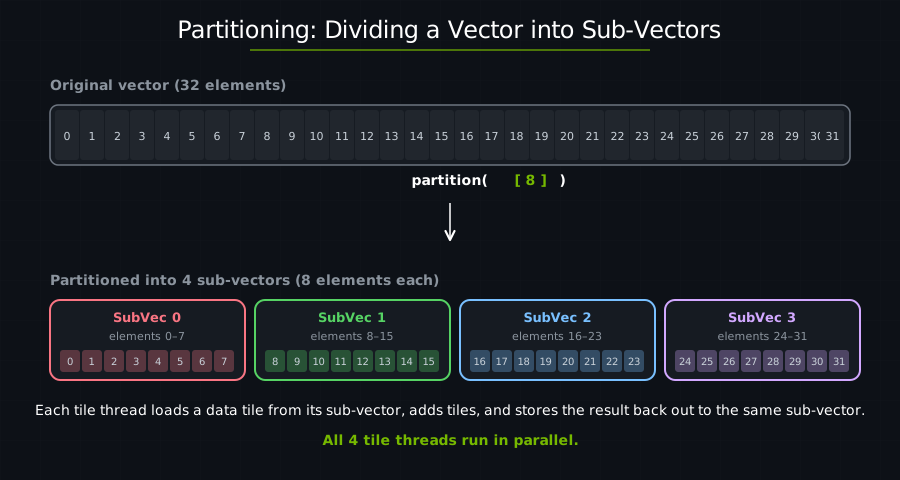
In cutile, tile threads run concurrently and each tile knows its coordinates via get_tile_block_id(). To make tiles process different pieces of data, we use partitioning — dividing the output tensor into sub-tensors so that each tile thread reads from and writes to a distinct region.
use cuda_async::device_operation::DeviceOp;
use cuda_core::Device;
use std::sync::Arc;
use cutile;
use cutile::api::{ones, zeros};
use cutile::error::Error;
use cutile::tensor::{IntoPartition, Tensor, ToHostVec, Unpartition};
use cutile::tile_kernel::TileKernel;

#[cutile::module]
mod my_module {
    use cutile::core::*;

    #[cutile::entry()]
    fn add<const S: [i32; 2]>(
        z: &mut Tensor<f32, S>,          // Output: has static shape S (the tile shape)
        x: &Tensor<f32, {[-1, -1]}>,     // Input: dynamic shape (full tensor)
        y: &Tensor<f32, {[-1, -1]}>      // Input: dynamic shape (full tensor)
    ) {
        let tile_x = load_tile_like(x, z);  // Load a tile from x using z's partitioning
        let tile_y = load_tile_like(y, z);  // Load a tile from y using z's partitioning
        z.store(tile_x + tile_y);              // Add and store result
    }
}

use my_module::add;

fn main() -> Result<(), Error> {
    let device = Device::new(0)?;
    let stream = device.new_stream()?;

    // Create input tensors: 32×32 matrices filled with 1.0
    let x: Arc<Tensor<f32>> = ones(&[32, 32]).sync_on(&stream)?.into();
    let y: Arc<Tensor<f32>> = ones(&[32, 32]).sync_on(&stream)?.into();

    // Create output tensor, PARTITIONED into 4×4 sub-tensors.
    let z = zeros(&[32, 32]).sync_on(&stream)?.partition([4, 4]);

    // Run the kernel — one tile thread per sub-tensor, for a total of 64 threads.
    let (z, _x, _y) = add(z, x, y).sync_on(&stream)?;

    // Verify results.
    let z_host: Vec<f32> = z.unpartition().to_host_vec().sync_on(&stream)?;
    println!("z[0] = {} (expected 2.0)", z_host[0]);

    Ok(())
}
Output:
z[0] = 2 (expected 2.0)
Partitioning#
Partitioning divides a tensor into a grid of sub-regions, each processed by one tile block. In cuTile Rust, partitioning works differently for mutable outputs (&mut Tensor) and read-only inputs (&Tensor).
Host-Side Partitioning (Required for &mut Tensor)#
let z = zeros(&[32, 32]).sync_on(&stream)?.partition([4, 4]);
Creates a 32×32 output tensor initialized to zeros.
Divides it into 4×4 sub-tensors.
Creates an 8×8 grid of sub-tensors (32÷4 = 8 in each dimension).
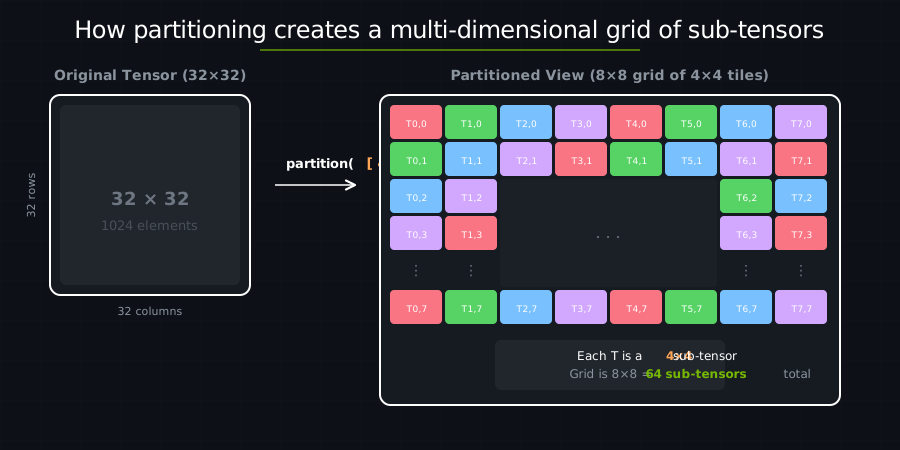
Mutable tensors must be partitioned on the host side before kernel launch. This guarantees that each tile block writes to a disjoint sub-region — satisfying Rust’s exclusive access requirement for mutable memory. The host-side Partition also determines the launch grid: cutile automatically infers that an 8×8 partition means 64 tile blocks.
On the host side, the generated launcher expects a Partition<Tensor<T>> for every &mut Tensor parameter, so you always call .partition(...) before passing the tensor.
Device-Side Partitioning (Available for &Tensor)#
Read-only inputs are passed as Arc<Tensor<T>> on the host side — no host-side partitioning required. Multiple tile blocks can safely read from the same or overlapping regions, so there is no exclusive-access constraint to enforce.
Instead, read-only tensors can be partitioned inside the kernel using .partition(const_shape![M, N]):
// Device-side: partition a read-only tensor inside the kernel.
let part_x = x.partition(const_shape![BM, BK]);
let tile = part_x.load([i, j]);
This is more flexible — the same &Tensor can be partitioned in different ways within the same kernel (e.g., in GEMM, x and y use different partition shapes).
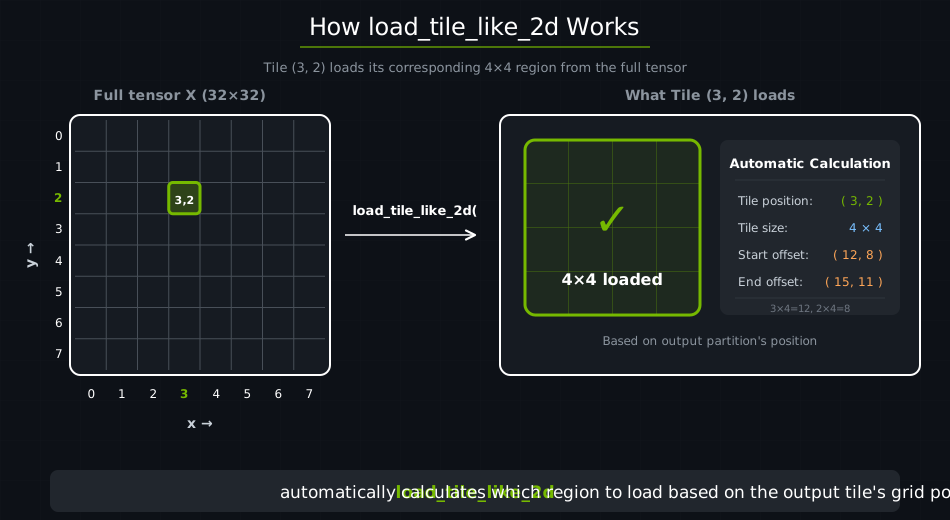
In this tutorial, we use load_tile_like(x, z) instead of explicit device-side partitioning. This convenience function partitions x using the same shape and coordinates as z, which is the common case for element-wise operations. Later tutorials (starting with matrix multiplication) use explicit device-side partitioning when inputs need different access patterns.
Putting It Together#
When you call add(z, x, y), cutile automatically:
Determines the grid size from
z’s host-side partition (8×8×1 = 64 tile blocks).Launches 64 tiles in parallel.
Each tile processes its 4×4 chunk.
The Kernel#
fn add<const S: [i32; 2]>(
    z: &mut Tensor<f32, S>,       // Output sub-tensor (4×4)
    x: &Tensor<f32, {[-1, -1]}>,  // Full input tensor
    y: &Tensor<f32, {[-1, -1]}>   // Full input tensor
) {
    let tile_x = load_tile_like(x, z);
    let tile_y = load_tile_like(y, z);
    z.store(tile_x + tile_y);
}
load_tile_like(x, z) loads a tile from x using the same tile shape (S=4×4) and coordinates (tile thread id) as z.
Compare to CUDA C++:
Task |
CUDA C++ |
cuTile Rust |
|---|---|---|
Calculate thread index |
|
Not needed |
Calculate global offset |
Manual pointer arithmetic |
|
Bounds checking |
|
Built-in |
Coalesced memory access |
Manual, error-prone |
Automatic |
The Load/Store Pattern#
Almost every kernel follows this pattern:
fn my_kernel(...) {
    // 1. LOAD: Global memory → tiles (registers).
    let tile_a = load_something(...);
    let tile_b = load_something_else(...);

    // 2. COMPUTE: Operate on tiles in registers.
    let result = tile_a + tile_b;

    // 3. STORE: Tiles (registers) → global memory.
    output.store(result);
}
Key Takeaways#
Concept |
What It Means |
|---|---|
Host-side partitioning |
|
Device-side partitioning |
|
Static shape |
The tile shape, static during JIT compilation |
Dynamic shape |
Dynamic tensor shape; does not trigger JIT recompilation when tensor shape changes |
load_tile_like |
Convenience for element-wise ops: loads from input using the same partitioning and mapping as the output |
Load/Store pattern |
Load → Compute → Store is the GPU kernel idiom |
Exercise 1: Change Tile Shape#
Modify the partition to [8, 8]:
let z = zeros(&[32, 32]).sync_on(&stream)?.partition([8, 8]);
How many tile threads are launched?
How many elements does each tile thread process?
Answer
32÷8 = 4 tiles per dimension → 4×4 = 16 tiles total.
Each tile thread processes 8×8 = 64 elements.
Exercise 2: Three-Way Addition#
Modify the kernel to add three tensors: z = x + y + w.
Hint
Add a third input parameter and load three tiles:
let tile_w = load_tile_like(w, z);
z.store(tile_x + tile_y + tile_w);
Exercise 3: Non-Square Partitions#
Try partition([4, 8]) — rectangular tiles. Does it still work?
See also#
Thinking in Tiles — tile blocks, partitioning, and the grid
Writing Computations — arithmetic and load/store operations
DSL API — full signatures for
load_tile_like,store, and the arithmetic operators used here