

3. SAXPY#
SAXPY stands for Single-precision A·X Plus Y — a classic numerical computing operation where a scalar multiplies a vector and the result is added to another vector:
y = a * x + y where a is a scalar, x and y are vectors
In cutile, operations happen between tiles. A scalar is just one number, so it can’t directly operate with a tile. The solution is to broadcast the scalar to match the tile’s shape.
Broadcasting#
Broadcasting takes a smaller value and replicates it to match a larger shape:
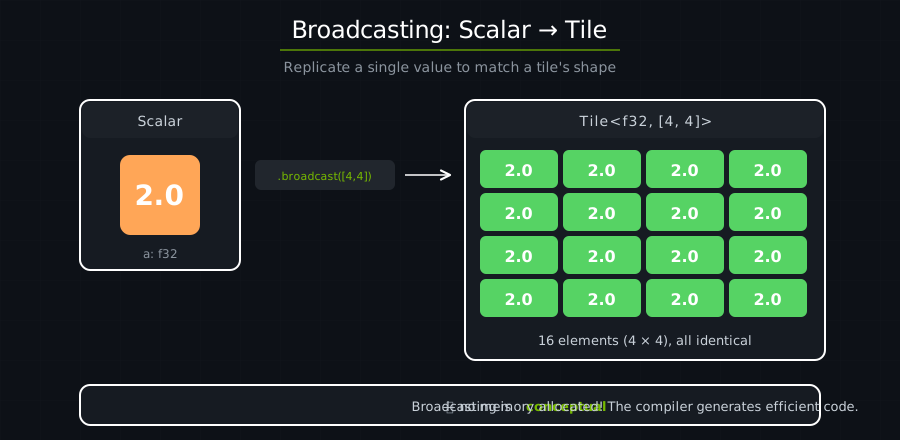
Broadcasting is conceptual — the GPU doesn’t actually allocate memory for all those copies. It’s a compile-time transformation that generates efficient code.
use cuda_async::device_operation::DeviceOp;
use cuda_core::Device;
use std::sync::Arc;
use cutile;
use cutile::api::arange;
use cutile::error::Error;
use cutile::tensor::{IntoPartition, Reshape, Tensor, ToHostVec, Unpartition};

#[cutile::module]
mod my_module {
    use cutile::core::*;

    #[cutile::entry()]
    fn saxpy<const S: [i32; 2]>(
        y: &mut Tensor<f32, S>,            // Vector input AND output (in-place)
        a: f32,                           // Scalar input
        x: &Tensor<f32, { [-1, -1] }>     // Vector input
    ) {
        let tile_a = a.broadcast(y.shape());  // Scalar → Tile
        let tile_x = load_tile_like(x, y);
        let tile_y = y.load();                // Load current y values
        y.store(tile_a * tile_x + tile_y);    // y = a*x + y
    }
}

use my_module::saxpy;

fn main() -> Result<(), Error> {
    let device = Device::new(0)?;
    let stream = device.new_stream()?;

    let a = 2.0f32;  // Our scalar multiplier

    // Create x and y as [0, 1, 2, ..., 31] reshaped to 4×8
    let input: Arc<Tensor<f32>> = arange(32usize).sync_on(&stream)?.into();
    let x: Arc<Tensor<f32>> = input.dup().sync_on(&stream)?.reshape(&[4, 8])?.into();
    let y = input.dup().sync_on(&stream)?.reshape(&[4, 8])?.partition([2, 2]);

    // Run: y = 2.0 * x + y = 2*x + x = 3*x
    let (y, a, _x) = saxpy(y, a, x).sync_on(&stream)?;
    let y_host: Vec<f32> = y.unpartition().to_host_vec().sync_on(&stream)?;

    // Verify
    for i in 0..5 {
        println!("{} * {} + {} = {} (got {})", a, i, i, 3 * i, y_host[i]);
    }

    Ok(())
}
Output:
2 * 0 + 0 = 0 (got 0)
2 * 1 + 1 = 3 (got 3)
2 * 2 + 2 = 6 (got 6)
2 * 3 + 3 = 9 (got 9)
2 * 4 + 4 = 12 (got 12)
In-Place Operations#
y is both an input and output:
let tile_y = y.load();             // Read current y
y.store(tile_a * tile_x + tile_y); // Write new y
This is an in-place operation — updating y rather than creating a new tensor. In-place updates reuse existing memory, avoiding the cost of a new allocation. SAXPY is traditionally in-place because it’s used in iterative algorithms where y is repeatedly updated.
Memory Flow#
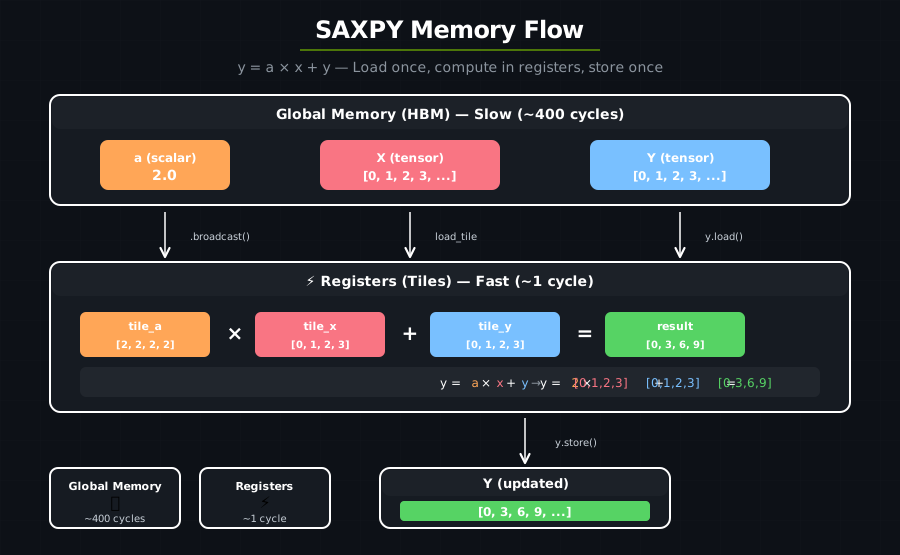
Global memory is slow (hundreds of cycles to access).
Registers are fast (single cycle).
We load once, compute in registers, store once.
Combining operations into a single kernel — kernel fusion — keeps data in fast registers instead of bouncing to slow global memory.
y.shape()#
In the kernel:
let tile_a = a.broadcast(y.shape());
y.shape() returns the compile-time known shape of the output partition ([2, 2] in our case). This tells broadcast exactly what size tile to create.
Key Takeaways#
Concept |
What It Means |
|---|---|
Broadcasting |
Replicate a scalar/small value to match a larger shape |
In-place ops |
Update a tensor in place instead of creating a new one |
Memory hierarchy |
Global (slow) → Registers (fast) → Global |
y.shape() |
Returns the static shape used to partition the tensor |
Exercise 1: Change the Scalar#
Try a = 0.5 for scaling down instead of up. What results do you expect?
Exercise 2: Different Operation#
Modify to compute y = a * x - y instead. What’s the expected result for element 3?
Answer
y = 2.0 * 3 - 3 = 3
Exercise 3: Two Scalars#
Modify the kernel to compute y = a * x + b * y where both a and b are scalars.
Hint
fn saxpy_extended<const S: [i32; 2]>(
    y: &mut Tensor<f32, S>,
    a: f32, b: f32,
    x: &Tensor<f32, {[-1, -1]}>
) {
    let tile_a = a.broadcast(y.shape());
    let tile_b = b.broadcast(y.shape());
    let tile_x = load_tile_like(x, y);
    let tile_y = y.load();
    y.store(tile_a * tile_x + tile_b * tile_y);
}
See also#
Writing Computations — scalar arithmetic and
broadcastWorking with Data — shape broadcasting rules
DSL API —
broadcast,broadcast_scalar, and arithmetic operator signatures