ScanNet Example
This example trains a semantic segmentation model on ScanNet indoor scenes using a MinkUNet-style encoder-decoder built with sparse convolutions.
Dataset
The script uses the pre-processed ScanNet 3D point clouds from the
OpenScene project. Each scene is
stored as (coords, colors, labels):
- coords:
(N, 3)float32 — 3D point positions - colors:
(N, 3)float32 — RGB color features - labels:
(N,)int — semantic class labels (20 classes, 255 = ignore)
The 20 semantic classes include: wall, floor, cabinet, bed, chair, sofa, table, door, window, bookshelf, picture, counter, desk, curtain, refrigerator, shower curtain, toilet, sink, bathtub, and other furniture.
The dataset is downloaded automatically on first run (~1.3 GB) to
./data/scannet_3d/.
Data augmentations are opt-in
Augmentations are disabled by default so the script stays minimal.
Set data.augmentations=true to apply the standard ScanNet recipe
(random rotation around the up-axis, scale, horizontal flip, point
dropout, chromatic auto-contrast / translation / jitter / drop).
Expect a 5–10 mIoU boost over the un-augmented baseline.
Network architecture
The default model is MinkUNet18, a U-Net with sparse convolution encoder and decoder blocks connected by skip connections. Available models:
| Model | Description |
|---|---|
warpconvnet.models.MinkUNet18 |
Lightweight U-Net (default) |
warpconvnet.models.MinkUNet34 |
Deeper encoder |
warpconvnet.models.MinkUNet50 |
ResNet-50 style blocks |
warpconvnet.models.MinkUNet101 |
ResNet-101 style blocks |
warpconvnet.models.SpaCeFormer |
Curve + space + window attention U-Net (see page) |
Input points are voxelized at voxel_size=0.02 and wrapped via
PointToVoxel, which handles the point-to-voxel conversion and
maps output features back to the original point resolution.
The model outputs per-point logits with shape (N, 20).
Setup
Install the optional model and training dependencies:
pip install "warpconvnet[models]"Additional requirements: hydra-core, omegaconf, torchmetrics.
Run
python examples/train/scannet.pyThe script uses Hydra for configuration. Override any parameter on the command line:
# Smaller batch size for limited GPU memory
python examples/train/scannet.py train.batch_size=4

# Use a deeper model
python examples/train/scannet.py model._target_=warpconvnet.models.MinkUNet34

# Change voxel size and learning rate
python examples/train/scannet.py data.voxel_size=0.05 train.lr=0.01

# Swap the backbone for SpaCeFormer (curve+space attention U-Net). The
# +-prefixed keys add SpaCeFormer-specific args MinkUNet does not have.
python examples/train/scannet.py \
    model._target_=warpconvnet.models.SpaCeFormer \
    +model.enc_attn_types=ssccc \
    +model.dec_attn_types=ssca \
    +model.use_rope=true
Configuration reference
Paths:
| Key | Default | Description |
|---|---|---|
paths.data_dir |
./data/scannet_3d |
Dataset directory |
paths.output_dir |
./results/ |
Output directory |
paths.ckpt_path |
null |
Checkpoint path to resume from |
Training:
| Key | Default | Description |
|---|---|---|
train.batch_size |
12 |
Training batch size |
train.lr |
0.001 |
AdamW learning rate |
train.epochs |
100 |
Number of training epochs |
train.step_size |
20 |
StepLR decay period (epochs) |
train.gamma |
0.7 |
StepLR decay factor |
train.num_workers |
8 |
DataLoader workers |
train.precision |
"16-mixed" |
"32" (fp32) or "16-mixed" (fp16 forward + GradScaler) |
Test:
| Key | Default | Description |
|---|---|---|
test.batch_size |
12 |
Test batch size |
test.num_workers |
4 |
DataLoader workers |
Data:
| Key | Default | Description |
|---|---|---|
data.num_classes |
20 |
Number of semantic classes |
data.voxel_size |
0.02 |
Voxelization resolution (meters) |
data.ignore_index |
255 |
Label index to ignore in loss/metrics |
data.augmentations |
false |
Apply geometric + chromatic training augs |
Model:
| Key | Default | Description |
|---|---|---|
model._target_ |
warpconvnet.models.MinkUNet18 |
Model class to instantiate |
model.in_channels |
3 |
Input feature channels (RGB) |
model.out_channels |
20 |
Output channels (num classes) |
model.in_type |
voxel |
Input type (voxel wraps model with PointToVoxel) |
General:
| Key | Default | Description |
|---|---|---|
device |
cuda |
Device |
use_wandb |
false |
Enable Weights & Biases logging |
seed |
42 |
Random seed |
Visualization (viser):
| Key | Default | Description |
|---|---|---|
viz.enabled |
false |
Spin up a viser server during training |
viz.port |
8080 |
Viser HTTP port |
viz.interval_seconds |
10.0 |
Min seconds between scene refreshes (per training loop) |
Data augmentations
Set data.augmentations=true to construct
default_train_augmentations(colors_in_unit_range=True)
and pass it via ScanNetDataset(transform=...). The default recipe is a
port of the SpatioTemporalSegmentation recipe
(chrischoy/SpatioTemporalSegmentation),
applied per training sample, before voxelization:
| Transform | Probability | Range / parameters |
|---|---|---|
RandomRotation3D() |
always | x: ±π/64, y: ±π/64, z: ±π (matches upstream) |
RandomScale((0.9,1.1)) |
always | uniform scale factor |
RandomHorizontalFlip(z) |
0.95 | independent flip per non-up axis |
RandomTranslationRatio() |
always | ±20 % of scene extent on x/y, none on z |
ElasticDistortion(((0.2,0.4),(0.8,1.6))) |
0.95 | two-pass smooth coord warp; mean displacement ≈ 27 cm |
RandomDropout(0.20) |
0.20 | drop 20 % of points |
ChromaticAutoContrast |
0.20 | per-scene auto-contrast, blended |
ChromaticTranslation(0.10) |
0.95 | scene-wide RGB tint, ±10 % of range |
ChromaticJitter(σ=0.01) |
0.95 | per-point Gaussian RGB noise |
ChromaticDrop |
0.05 | replace all RGB with mid-gray |
Test-time data is not augmented (test loader uses the bare
ScanNetDataset).
# Default minimal training (no augs)
python examples/train/scannet.py

# Standard augmented recipe (recommended)
python examples/train/scannet.py data.augmentations=true
To customize the pipeline, build your own Compose([...]) and pass it as
the transform argument to ScanNetDataset. See
warpconvnet/dataset/transforms.py
for the available transform classes.
About ElasticDistortion
Needs scipy and is the slowest transform in the recipe (~0.4 s per
sample). It produces a smooth random warp of coordinate space — flat
walls bow, chair legs curl. Mean per-point displacement at the upstream
parameters ((0.2, 0.4), (0.8, 1.6)) is ≈ 27 cm with p95 ≈ 41 cm.
Disable by passing your own Compose([...]) without it if profiling
shows the dataloader is your bottleneck.
Skipped from upstream
HueSaturationTranslation (marginal mIoU contribution) is not included
by default. Add it yourself if you want the full upstream recipe.
Live Minecraft-style visualization (viser)
Set viz.enabled=true to launch an embedded
viser server while training. The visualizer
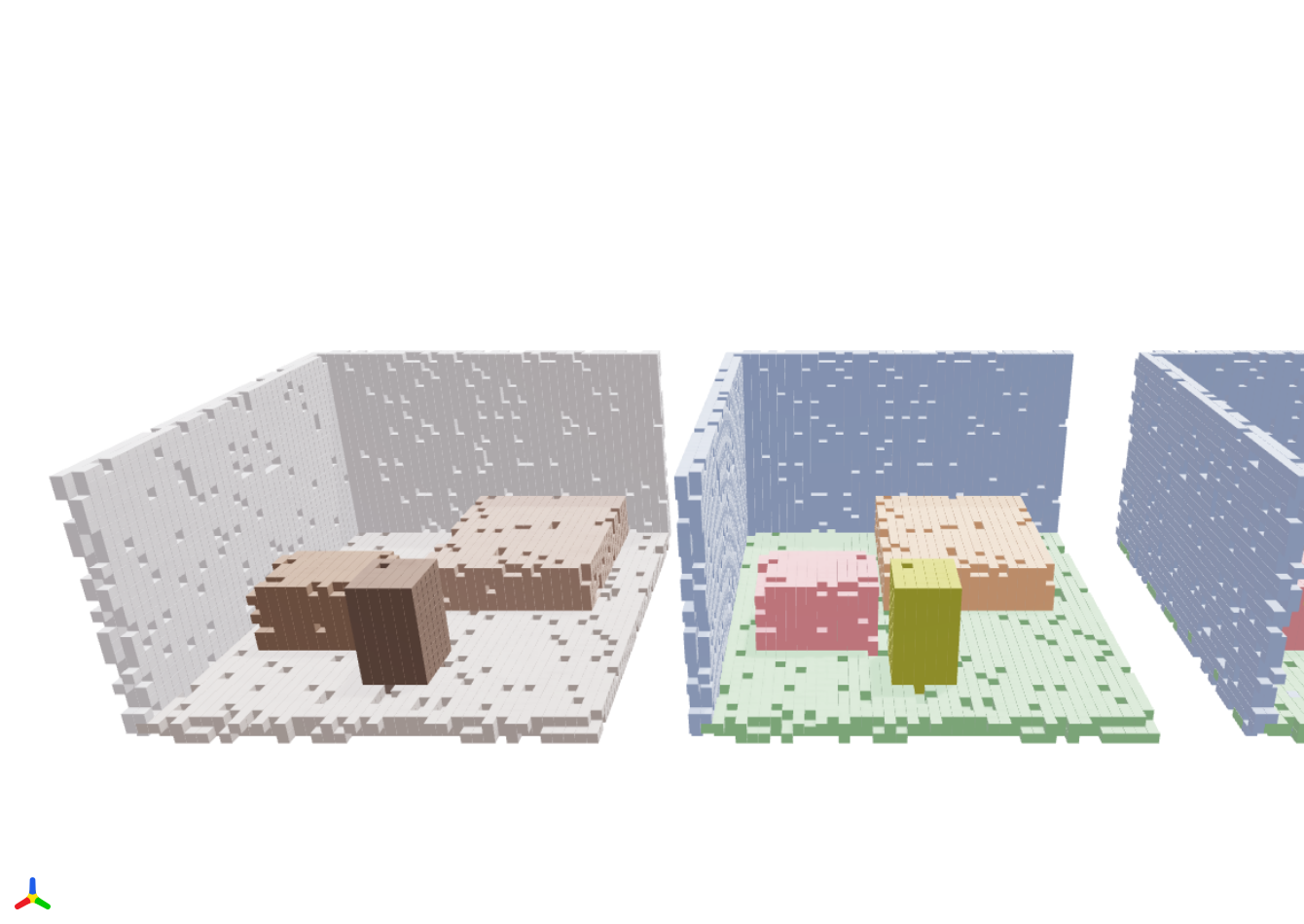
renders one scan from each batch as three side-by-side voxel scenes:
- Left — input RGB (per-voxel mean color)
- Middle — ground-truth segmentation (per-voxel majority label)
- Right — model prediction (per-voxel majority argmax)
Each occupied voxel is drawn as an axis-aligned cube, giving the scene a
Minecraft-like look that makes the discrete sparse-conv grid structure
obvious. The scene refreshes at most once every viz.interval_seconds
seconds so it never stalls the training loop.
# Train + visualize
python examples/train/scannet.py viz.enabled=true viz.port=8080 viz.interval_seconds=10
# Open http://localhost:8080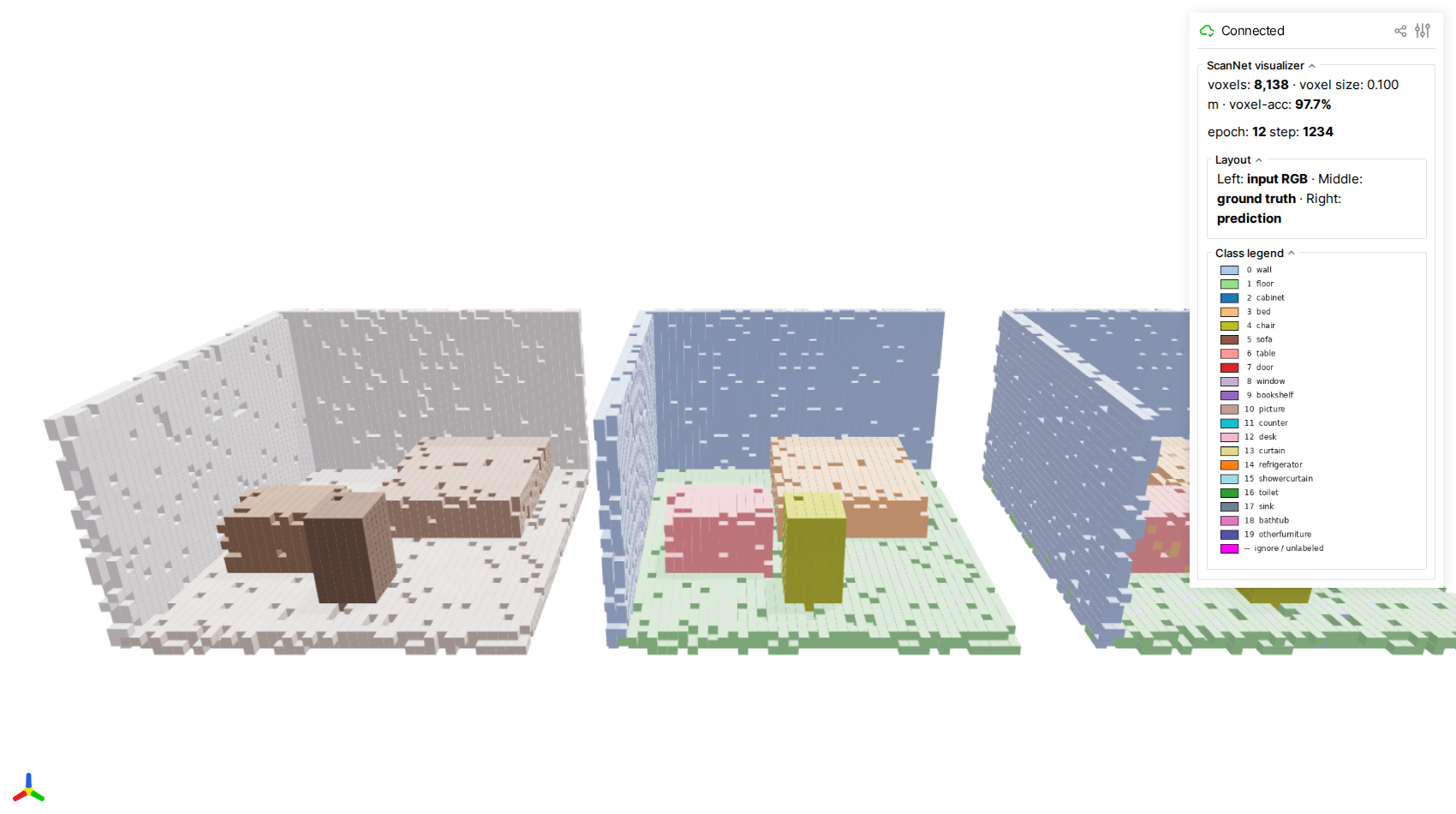
The three panels (input · GT · prediction) use the same camera and identical voxelization, so misclassified voxels jump out as color speckles when the right panel diverges from the middle one.
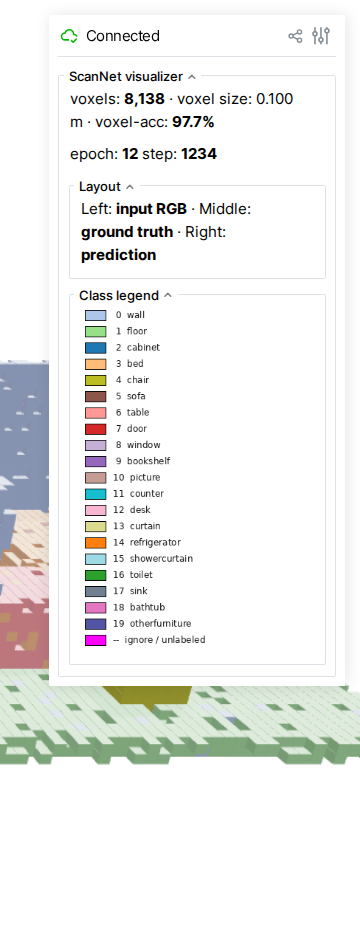
The GUI sidebar surfaces live metrics — total occupied voxels, voxel-level accuracy of the current frame, and the current epoch / step — alongside a class-color legend matching the standard ScanNet 20-class palette.
About these screenshots
The screenshots above were captured by running the visualizer against a hand-crafted synthetic mini-room (no GPU, no ScanNet data, no checkpoint required). Regenerate them with:
```bash
pip install "warpconvnet[demo]" viser playwright
playwright install chromium
python docs/examples/scripts/capture_viser_screenshots.py
```
Expected output
Each epoch prints a progress bar followed by test-set evaluation with accuracy and mean IoU:
Train Epoch: 1 Loss:  2.143: 100%|██████████| 104/104
Test set: Average loss:  1.8234, Accuracy:  42.15%, mIoU:  18.73%
After 100 epochs with default settings, expect roughly:
- Overall accuracy: ~75-80%
- mIoU: ~55-65%
Results will vary with augmentation, model choice, and voxel size. This example is intended as a starting point, not a benchmark-tuned recipe.