TRELLIS.2 Viser Visualizer
Use the TRELLIS.2 viser viewer to run image-to-3D inference from a browser and inspect the generated mesh interactively.
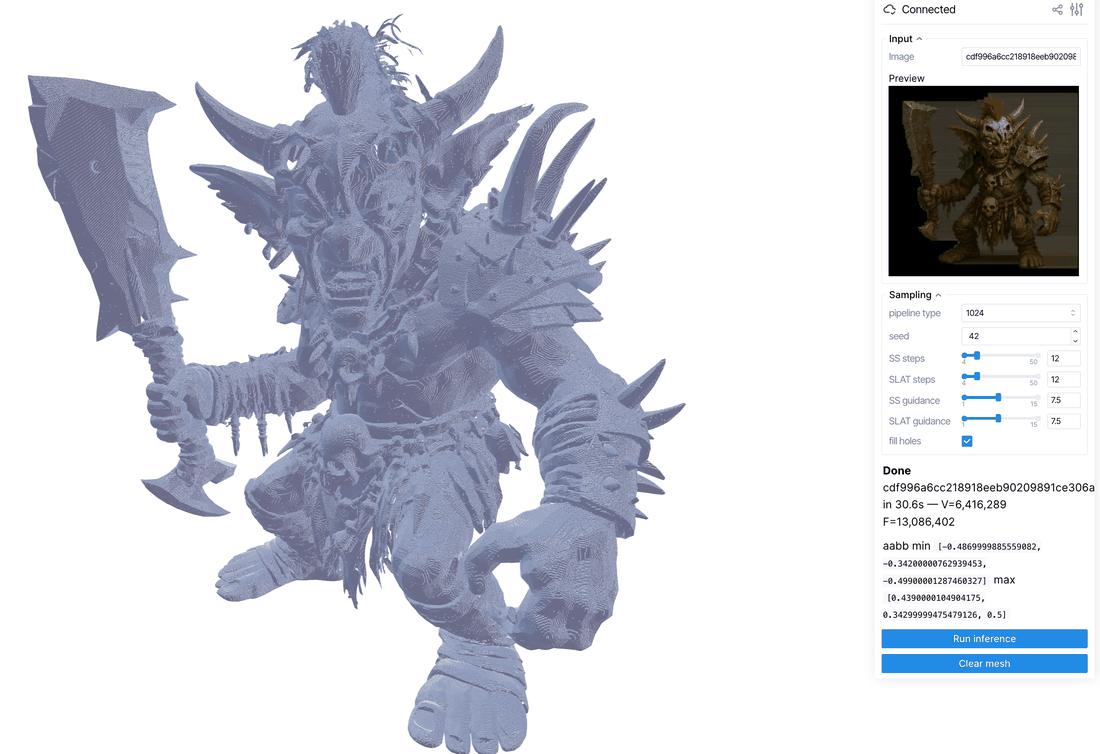
The script lives at
examples/inference/trellis2_viser.py.
It loads the TRELLIS.2 image-to-3D pipeline once, then lets you switch input
images, tune sampler settings, run inference, and view the resulting mesh in
the viser scene.
Setup
Install WarpConvNet with model and shared demo dependencies, then add the viewer-specific TRELLIS runtime dependencies:
pip install "warpconvnet[models,demo]" viser pillow safetensors transformersThe first run downloads model weights from Hugging Face:
microsoft/TRELLIS.2-4Bmicrosoft/TRELLIS-image-large
Use a CUDA environment with enough GPU memory for the selected pipeline mode.
Pass --no_1024 if you only need the 512 mode and want to skip loading the
1024 SLAT flow.
Run
Launch the viewer with one or more input images:
python examples/inference/trellis2_viser.py \
    --images /path/to/image1.png /path/to/image2.webp \
    --port 8080
Or point it at a directory of images:
python examples/inference/trellis2_viser.py \
    --image_dir /path/to/images \
    --port 8080
For the lighter 512-only path:
python examples/inference/trellis2_viser.py \
    --image_dir /path/to/images \
    --no_1024
Open the printed URL, usually http://localhost:8080, in a browser.
Controls
| Control | Description |
|---|---|
Image |
Selects one of the input images. |
pipeline type |
Chooses 512, 1024, 1024_cascade, or 1536_cascade. |
seed |
Sets the sampling seed. |
SS steps |
Controls sparse-structure sampler steps. |
SLAT steps |
Controls structured-latent sampler steps. |
SS guidance |
Sets sparse-structure classifier-free guidance strength. |
SLAT guidance |
Sets structured-latent classifier-free guidance strength. |
fill holes |
Toggles mesh hole filling in the shape decoder. |
Run inference |
Generates a mesh for the current image and sampler settings. |
Clear mesh |
Removes the displayed mesh from the scene. |
Results are cached by image path and sampler settings inside the running process. Re-running the same configuration redraws the cached mesh instead of running the pipeline again.