

Async Execution#
Understanding cuTile Rust’s async execution model is essential for writing efficient GPU programs.
Two Worlds: Host and Device#
GPU programming involves two processors working together:
Host (CPU) — Orchestrates operations, launches kernels, manages memory
Device (GPU) — Executes kernels in massively parallel fashion
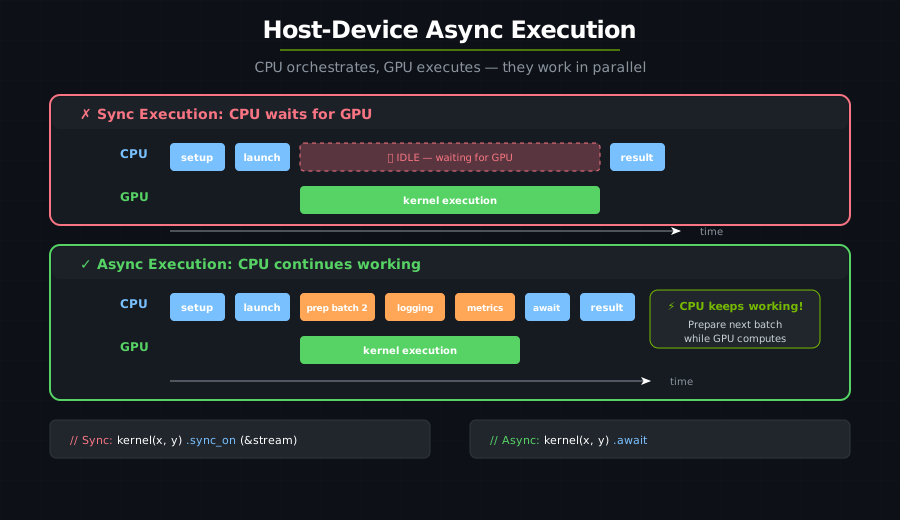
This separation is fundamental: your Rust code runs on the CPU and schedules work on the GPU.
Streams: Queues for GPU Work#
A stream is a sequence of operations that execute in order on the GPU:
let ctx = CudaContext::new(0)?;      // Connect to GPU device 0
let stream = ctx.new_stream()?;       // Create a work queue
Key properties of streams:
Operations on the same stream execute in order
Operations on different streams may execute concurrently
Synchronization points wait for stream completion
DeviceOperations: Lazy Computation Graphs#
The core abstraction is DeviceOperation — a lazy operation that describes GPU work without executing it.
What’s a DeviceOperation?#
Think of it as a recipe that hasn’t been cooked yet:
let z = api::zeros([64, 64]);  // DeviceOperation<Output=Tensor<f32>>
// Nothing happened yet! Just built a description of what to do.

let result = z.await;  // NOW it executes: allocates GPU memory, fills with zeros
The Key Trait#
pub trait DeviceOperation: Send + Sized + IntoFuture
where Self::Output: Send {
    // ...
}
Every DeviceOperation implements IntoFuture, which means every operation is awaitable.
The Execution Flow#
When you .await a DeviceOperation, here’s what happens:
Your Code             Tokio Runtime            cuTile Rust            GPU
    |                       |                       |                   |
.await  ---------------> into_future()            |                   |
    |                   (immediate)               |                   |
    |                       |                       |                   |
    |                       | -------------------> schedule()          |
    |                       |                    DevicePolicy         |
    |                       |                       |                   |
    |                       | <------------------- DeviceFuture        |
    |                       |                       |                   |
    |                 first poll() ---------------> execute()           |
    |                       |                       |                   |
    |                       |                       | ----------------> GPU WORK!
    |                       |                       |                   |
    |              subsequent polls <-- - - - - -|- - - - - - -->| checking...
    |                       |                       |                   |
    |                       |                       |                   |
Returns <-------------- Ready! <------------------|------------------+
execute(), not at .await!
Step-by-step:
.awaitconverts toIntoFuture::into_future()into_future()immediately callsDevicePolicy::schedule()and returns aDeviceFutureTokio’s first poll calls
DeviceFuture::poll()→ this triggersexecute()execute()submits work to the GPU (kernel launch, memory copy, etc.)Subsequent polls check if GPU work is complete
When done, returns
Poll::Ready(result)
When Does GPU Work Actually Happen?#
Consider the following snippet:
let x = api::randn(0.0f32, 1.0f32, [m, k]).arc().await;
This is what each method does:
Step |
Code |
GPU Work? |
|---|---|---|
1 |
|
❌ Allocates CPU memory, creates DeviceOperation |
2 |
|
❌ Wraps in Arc, still lazy |
3 |
|
❌ Creates DeviceFuture |
4 |
First poll |
✅ NOW executes the GPU copy |
5 |
Completion |
Returns tensor |
GPU work happens during the first poll, not when you call .await!
Synchronous vs Asynchronous Execution#
Synchronous Pattern#
let launcher = kernel(args...);
let result = launcher
    .grid((x, y, z))
    .sync_on(&stream);  // Launch AND wait
The sync_on method:
Launches the kernel
Blocks until completion
Returns the result
Use this for:
Simple scripts
When you need results immediately
Debugging
Asynchronous Pattern#
let op = kernel_op(args...);
let fut = op.into_future();
let result = fut.await;  // Non-blocking in async context
Or, if the inputs are already grouped into one DeviceOperation:
let args = zip!(z_op, x_op, y_op);
let (z, x, y) = args.apply(kernel_apply).await;
Use this for:
Production code
Overlapping computation and I/O
Building complex pipelines
Building Computation Graphs#
DeviceOperations compose into computation graphs:
// Build lazy computation graph
let x = api::randn(0.0, 1.0, [m, k]);
let y = api::randn(0.0, 1.0, [k, n]);
let z = api::zeros([m, n]).partition([bm, bn]);

// Chain kernel invocations
let result = matmul_op(z, x.arc(), y.arc())
    .and_then(|(z, _x, _y)| activation_op(z))
    .and_then(|(z,)| normalize_op(z));

// Execute entire graph
let output = result.await;
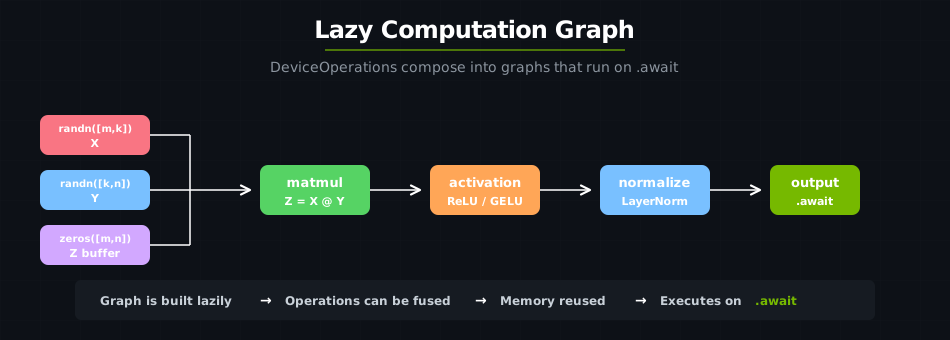
Benefits:
Operations can be fused
Memory can be reused
Scheduling can be optimized
Sync Points and Memory Management#
When to Sync#
You need synchronization when:
Reading results back to CPU
Before modifying data that’s still being read
At computation boundaries
// Bad: No sync before reading
let z = kernel_op(x, y).sync_on(&stream);
let data = z.to_host_vec();  // ❌ May read incomplete data!

// Good: Sync before reading
let z = kernel_op(x, y).sync_on(&stream);
let data = z.to_host_vec().sync_on(&stream);  // ✅ Waits for completion
Streams and Scheduling#
This section explains when GPU operations run in order and when they can overlap. Understanding this is critical for both correctness and performance.
The One Rule of CUDA Streams#
A CUDA stream is an ordered queue of GPU work. The rule is simple:
Operations on the same stream always execute in submission order. Operations on different streams may execute concurrently — the GPU is free to overlap them.
This means the stream an operation lands on determines its ordering guarantees with respect to other operations.
Default Behavior: Round-Robin Stream Pool#
When you call .await or .sync(), cutile does not put every operation on a single stream. Instead, it uses a round-robin scheduling policy that rotates through a pool of streams:
                         ┌─────────────────────────────────────────┐
  Your Code              │          GPU (4-stream pool)            │
 ─────────────           │                                         │
                         │  Stream 0: ████████                     │
  op_a.await  ──────────►│  Stream 1:    ████████                  │
  op_b.await  ──────────►│  Stream 2:       ████████               │
  op_c.await  ──────────►│  Stream 3:          ████████            │
  op_d.await  ──────────►│  Stream 0:             ████████         │
  op_e.await  ──────────►│                                         │
                         └─────────────────────────────────────────┘
The default pool has 4 streams. Each new operation goes to the next stream in rotation (0 → 1 → 2 → 3 → 0 → …). Because they land on different streams, independent operations can overlap — the GPU can work on multiple kernels or memory transfers simultaneously.
When Operations Serialize#
Even with the round-robin pool, operations will run in order in these cases:
1. Same stream (wrap-around)
Every 4th operation lands on the same stream. If op_a and op_e are both on Stream 0, op_e waits for op_a to finish:
Stream 0: ████████ (op_a)         ████████ (op_e waits for op_a)
Stream 1:    ████████ (op_b)
Stream 2:       ████████ (op_c)
Stream 3:          ████████ (op_d)
2. Chained with .and_then()
Operations composed with .and_then() share a single stream, so the second operation always sees the first one’s output:
let result = allocate_tensor()
    .and_then(|tensor| fill_with_ones(tensor))  // same stream → ordered
    .and_then(|tensor| run_kernel(tensor))       // same stream → ordered
    .await;
3. Explicit stream with .sync_on()
When you pass the same stream to multiple .sync_on() calls, all operations serialize on that stream:
let stream = ctx.new_stream()?;

let a = op_a.sync_on(&stream);  // Stream X: runs first
let b = op_b.sync_on(&stream);  // Stream X: waits for op_a
let c = op_c.sync_on(&stream);  // Stream X: waits for op_b
4. Awaiting sequentially
Each .await blocks the host until its GPU work completes (the DeviceFuture polls until the stream callback fires). So even though op_a and op_b may be on different streams, awaiting them one-by-one means op_b is not submitted until op_a’s result is ready on the host:
let a = op_a.await;  // Host waits for GPU to finish op_a
let b = op_b.await;  // op_b submitted after op_a is confirmed done
// These effectively serialize, even on different streams.
When Operations Can Overlap#
Overlap requires two things: (1) operations land on different streams, and (2) they are submitted to the GPU before waiting for each other.
Building a lazy graph with zip! + apply:
// These three allocations form a single DeviceOperation graph.
// When awaited, the policy submits them to the GPU in quick succession.
let args = zip!(
    zeros([1024, 1024]).partition([64, 64]),
    x.device_operation(),
    y.device_operation(),
);
let (z, _x, _y) = args.apply(kernel_apply).unzip();

// All three inputs were submitted together — they can overlap.
let result = z.unpartition().await;
Using tokio::join! for independent work:
// Both futures are polled concurrently by the async runtime.
// They will likely land on different streams and overlap on the GPU.
let (result_a, result_b) = tokio::join!(
    kernel_a(x.clone()),
    kernel_b(y.clone()),
);
Data Dependencies: Your Responsibility#
The round-robin policy does not track data dependencies. If operation B reads the output of operation A, you must ensure A finishes before B starts. Otherwise B may read stale or partially-written data.
Safe patterns for dependent operations:
// Pattern 1: Chain with .and_then() — same stream, automatic ordering
let result = create_tensor()
    .and_then(|t| process(t))
    .await;

// Pattern 2: Await sequentially — host ensures ordering
let tensor = create_tensor().await;
let result = process(tensor).await;

// Pattern 3: Pin to the same stream — CUDA guarantees ordering
let stream = ctx.new_stream()?;
let tensor = create_tensor().sync_on(&stream);
let result = process(tensor).sync_on(&stream);
Unsafe pattern to avoid:
// ⚠️ DANGER: op_b may start before op_a finishes if they land on different streams!
let future_a = op_a.into_future();  // Submitted to Stream 0
let future_b = op_b_reads_a_output.into_future();  // Submitted to Stream 1
let (a, b) = tokio::join!(future_a, future_b);
// op_b might read incomplete data from op_a.
Choosing the Right Execution Method#
Method |
Stream assignment |
Ordering guarantee |
Best for |
|---|---|---|---|
|
Shares parent’s stream |
Strict — same stream |
Dependent operations |
|
Your explicit stream |
Strict — if same stream |
Debugging, deterministic pipelines |
|
Policy picks (round-robin) |
None between calls |
Quick scripts |
|
Policy picks (round-robin) |
None between awaits |
Async code (see note below) |
|
Single stream for the graph |
Strict within the graph |
Kernel launch patterns |
Tip
Sequential .await calls appear ordered from the host’s perspective (each waits before the next starts), but the GPU work for each .await runs on whichever stream the policy assigns. For truly independent operations you want to overlap, use zip! or tokio::join!.
Performance Tips#
1. Batch Operations#
// Bad: Many small syncs
for i in 0..1000 {
    let result = kernel_op(data[i]).sync_on(&stream);
}

// Good: Build graph, sync once
let ops: Vec<_> = (0..1000).map(|i| kernel_op(data[i])).collect();
let results = join_all(ops).await;
2. Overlap Computation and Memory Transfers#
The default round-robin policy already enables this — consecutive operations land on different streams, so a kernel on Stream 0 can overlap with a memory transfer on Stream 1:
// These naturally overlap with the default 4-stream pool:
let compute_op = heavy_kernel(input.clone());
let transfer_op = api::zeros([next_batch_size, dim]);

// Submit both before waiting for either:
let (result, next_buffer) = tokio::join!(compute_op, transfer_op);
For explicit control, create dedicated streams:
let compute_stream = ctx.new_stream()?;
let transfer_stream = ctx.new_stream()?;

let result = heavy_kernel(input).sync_on(&compute_stream);
let next_batch = load_data().sync_on(&transfer_stream); // overlaps!
3. Use Appropriate Grid Sizes#
// Match grid to your data size
let num_tiles = data.len() / tile_size;
launcher.grid((num_tiles as u32, 1, 1)).sync_on(&stream);
Summary#
Concept |
What it is |
|---|---|
DeviceOperation |
Lazy computation description |
Stream |
Ordered queue of GPU work |
SchedulingPolicy |
Decides which stream each operation uses |
Round-Robin (default) |
Rotates across 4 streams — enables overlap |
SingleStream |
All ops on one stream — strict ordering |
sync_on() |
Execute on an explicit stream and wait |
await |
Execute via the default device’s scheduling policy (async) |
.and_then() |
Chain operations on the same stream |
Arc |
Share data across operations |
Key takeaways:
The default policy distributes work across 4 streams — consecutive operations can overlap.
Operations on the same stream are always ordered; operations on different streams are not.
Use
.and_then(), sequential.await, or.sync_on()with a shared stream to enforce ordering between dependent operations.Use
zip!,.apply(), ortokio::join!to enable overlap for independent operations.
Continue to Performance Tuning for optimization techniques, Interoperability for integrating custom CUDA kernels into the DeviceOperation model, or Debugging for troubleshooting.